1. Бүтээгдэхүүн дууссанview
The OnePlus 15 is an advanced Android smartphone designed for high performance and extended usage. It features a powerful Snapdragon 8 Elite Gen 5 processor, a large 7,300mAh battery, and a vibrant 6.78-inch 165 Hz AMOLED display. The device is equipped with a triple 50 MP camera system for detailed photography and offers robust durability with IP66/IP68/IP69 and IP19K ratings for dust and water resistance.
Гол онцлогууд:
- Massive 7,300 mAh Battery: Provides extended power for all-day use and beyond.
- Tri-Chip System: Integrates the Snapdragon 8 Elite Gen 5, a dedicated Wi-Fi chip, and a CPU scheduler for optimized performance, connectivity, and efficiency.
- Triple 50 MP Camera System: Captures high-quality images with wide, ultra-wide, and telephoto capabilities.
- Бат бөх дизайн: Built to resist dust and water, with IP66/IP68/IP69 and IP19K ratings for enhanced protection.
- 6.78-inch 165 Hz AMOLED Display: Delivers vivid colors, smooth motion, and exceptional clarity.
2. Хайрцагт юу байна
Таны бүтээгдэхүүний савлагаанд бүх зүйл байгаа эсэхийг шалгана уу:
- OnePlus 15 Smartphone x1
- Цэнэглэгч x1
- USB мэдээллийн кабель x1
- SIM Ejector Tool x1
- Хурдан гарын авлага x1
- Safety Guide x1

Image: Contents of the OnePlus 15 retail box, showing the smartphone, charger, USB data cable, SIM ejector tool, quick guide, and safety guide.
3. Тохиргоо
3.1 SIM карт суурилуулах
- Locate the SIM card tray on the side of your OnePlus 15.
- Insert the provided SIM ejector tool into the small hole on the SIM tray. Press firmly until the tray pops out.
- Place your Nano-SIM card(s) into the tray with the gold contacts facing down. Ensure they are correctly oriented according to the tray's outline.
- Carefully push the SIM tray back into the phone until it is flush with the device.
3.2 Анхдагч асаалт ба тохиргоо
- Press and hold the Power button (located on the right side of the device) until the OnePlus logo appears.
- Дэлгэц дээрх зааврыг дагаж хэлээ сонгож, Wi-Fi сүлжээнд холбогдож, Google бүртгэлээ тохируулна уу.
- You may be prompted to transfer data from an old device. Follow the instructions or skip this step to set up as a new device.
- Configure security settings such as fingerprint unlock, face unlock, or a PIN/pattern.

Зураг: Урд view of the OnePlus 15 smartphone, showcasing түүний дэлгэц болон урд камер.
4. Төхөөрөмжөө ажиллуулах
4.1 Screen and Navigation
The OnePlus 15 features a 6.78-inch 165 Hz AMOLED display. Navigate the interface using touch gestures:
- Товш: Зүйл сонгох эсвэл функцийг идэвхжүүлэх.
- Шудрах: Дэлгэц эсвэл жагсаалтаар гүйлгэх.
- Чимхэх: Зургийг томруулж эсвэл жижигрүүлэх ба web хуудаснууд.
- Урт хэвлэл: Контекст цэс рүү нэвтрэх эсвэл дүрсийг зөөх.
4.2 Товчлуур ба портууд
Familiarize yourself with the physical controls and connections:
- Цахилгаан товч: Located on the right side. Press to wake/sleep the screen, long press to power off or restart.
- Дууны товчлуурууд: Located on the left side. Adjust media volume, ringtone volume, and alarm volume.
- USB Type-C порт: Located at the bottom. Used for charging, data transfer, and connecting Type-C headphones.
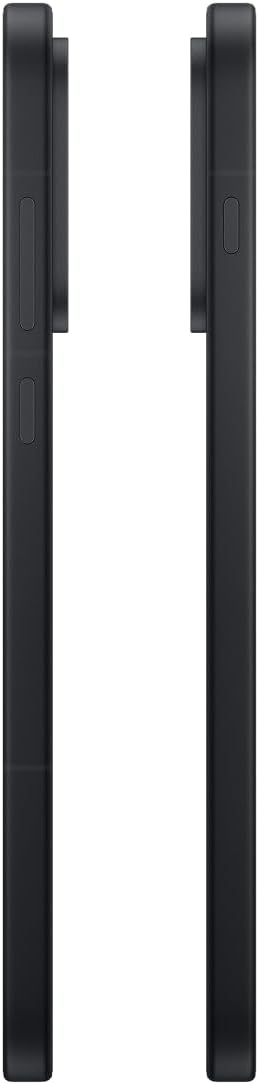
Зураг: хажуу тал view of the OnePlus 15, showing the placement of the power and volume buttons.
4.3 Камерын хэрэглээ
The OnePlus 15 features a versatile triple 50 MP camera system. To open the camera app, tap the camera icon on your home screen or lock screen.
- Солих горимууд: Swipe left or right on the screen to switch between Photo, Video, Portrait, and other modes.
- Томруулах: Pinch in or out on the viewfinder, or tap the zoom icons (e.g., 0.6x, 1x, 2x) to adjust magnification.
- Зураг авах: Зураг авах эсвэл видео бичлэг эхлүүлэх/зогсоохын тулд Хөшигний товчийг товшино уу.
- Тохиргоо: Access camera settings for features like flash, timer, aspect ratio, and more.

Зураг: Буцах view of the OnePlus 15, highlighting the triple 50 MP camera system.
4.4 Батерейны удирдлага
Your OnePlus 15 is equipped with a 7,300 mAh battery. To optimize battery life:
- Adjust screen brightness and set a shorter screen timeout.
- Ашиглаагүй үед Wi-Fi, Bluetooth болон GPS-г идэвхгүй болгох.
- Close background apps that are consuming power.
- Utilize Battery Saver mode when your battery is low.
- Use the provided charger and USB cable for optimal fast charging.
5. Засвар үйлчилгээ
5.1 Төхөөрөмжөө цэвэрлэх
To clean your OnePlus 15:
- Дэлгэц болон арын самбарыг зөөлөн, хөвөнгүй даавуугаар арчина.
- Зөрүүд толбоны хувьд бага зэрэг dampдаавуунд ус эсвэл дэлгэц цэвэрлэгчээр .
- Химийн хатуу бодис, зүлгүүрийн материал, шахсан агаар ашиглахаас зайлсхий.
5.2 Програм хангамжийн шинэчлэлтүүд
Тогтмол програм хангамжийн шинэчлэлтүүд нь шинэ боломжууд, аюулгүй байдлын сайжруулалт, алдааг засдаг. Шинэчлэлтүүдийг шалгахын тулд:
- руу оч Тохиргоо > Төхөөрөмжийн тухай > OxygenOS version.
- Товш Шинэчлэлт байгаа эсэхийг шалгана уу.
- If an update is available, follow the on-screen instructions to download and install it. Ensure your device has sufficient battery and is connected to Wi-Fi before updating.
6. Алдаа засах
If you encounter issues with your OnePlus 15, try the following common troubleshooting steps:
- Төхөөрөмж хариу өгөхгүй байна: Дахин асаахын тулд асаах товчийг 10 секунд орчим барина уу.
- Гэмтсэн програмууд: Clear the cache and data for the problematic app in Тохиргоо > Програмууд > [Аппын нэр] > Хадгалах сан болон кэш.
- Батерей хурдан дуусдаг: Review зайны хэрэглээ Тохиргоо > Батерей to identify power-hungry apps. Adjust settings as described in Section 4.4.
- Сүлжээний холболттой холбоотой асуудлууд: Toggle Airplane Mode on and off, restart your device, or reset network settings in Тохиргоо > Системийн тохиргоо > Нөөцлөх, дахин тохируулах > Утсаа дахин тохируулах > Wi-Fi, гар утас, Bluetooth-г дахин тохируулна уу.
- Screen protector installation: For assistance with screen protector installation, refer to the following video guide:
Video: Installation guide for a screen protector on the OnePlus 15 5G. This video demonstrates the steps to correctly apply a screen protector to your device.
7. Техникийн үзүүлэлтүүд
| Загварын нэр | OnePlus 15 |
| Загварын дугаар | CPH2749 |
| Бүтээгдэхүүний хэмжээс | 6.36 x 3.02 x 0.33 инч |
| Зүйлийн жин | 1.29 фунт |
| Үйлдлийн систем | Android 16 |
| CPU загвар | Snapdragon 8 Elite Gen 5 |
| CPU-ийн хурд | 4.61 GHz |
| Суулгасан RAM санах ойн хэмжээ | 12 ГБ |
| Санах ойн хадгалах багтаамж | 256 ГБ |
| Дэлгэцийн хэмжээ | 6.78 инч |
| Шийдвэр | 2772*1272 |
| Сэргээх хурд | 165 Гц |
| Зайны багтаамж | 7300 саяamp Цаг |
| Утсаар ярих цаг | 68.7 цаг |
| Холболтын технологиуд | Bluetooth, Infrared, NFC, USB, Wi-Fi |
| Онцлог шинж чанарууд | Dual SIM, Wireless Charging |
| Үйлдвэрлэгч | OnePlus |
8. Аюулгүй байдлын чухал мэдээлэл
Please read all safety information before using your device to ensure safe and proper use. Improper use may cause damage to the device or personal injury.
- Төхөөрөмжийг хэт өндөр температур эсвэл нарны шууд тусгалд удаан хугацаагаар байлгаж болохгүй.
- Зөвхөн зөвшөөрөгдсөн цэнэглэгч, батерей, дагалдах хэрэгслийг ашигла.
- Төхөөрөмжийг унагах эсвэл хүчтэй цохилтонд оруулахаас зайлсхий.
- Keep the device away from water and liquids, despite its water resistance ratings, to prevent potential damage.
- Төхөөрөмжийг задлах, өөрчлөхийг бүү оролд.
9. Баталгаат хугацаа ба дэмжлэг
Your OnePlus 15 is covered by a manufacturer's warranty. For detailed warranty information, technical support, or service inquiries, please visit the official OnePlus webсайт эсвэл харилцагчийн үйлчилгээтэй холбоо барина уу.
Та нэмэлт дэмжлэг болон бүтээгдэхүүний мэдээллийг эндээс авах боломжтой OnePlus Store.