Танилцуулга
Thank you for choosing the FreedConn R3Pro Motorcycle Intercom with 2K Camera. This device is designed to enhance your riding experience by providing seamless communication, high-definition video recording, and entertainment features. This manual provides detailed instructions on how to set up, operate, and maintain your R3Pro unit. Please read it carefully before use to ensure optimal performance and safety.
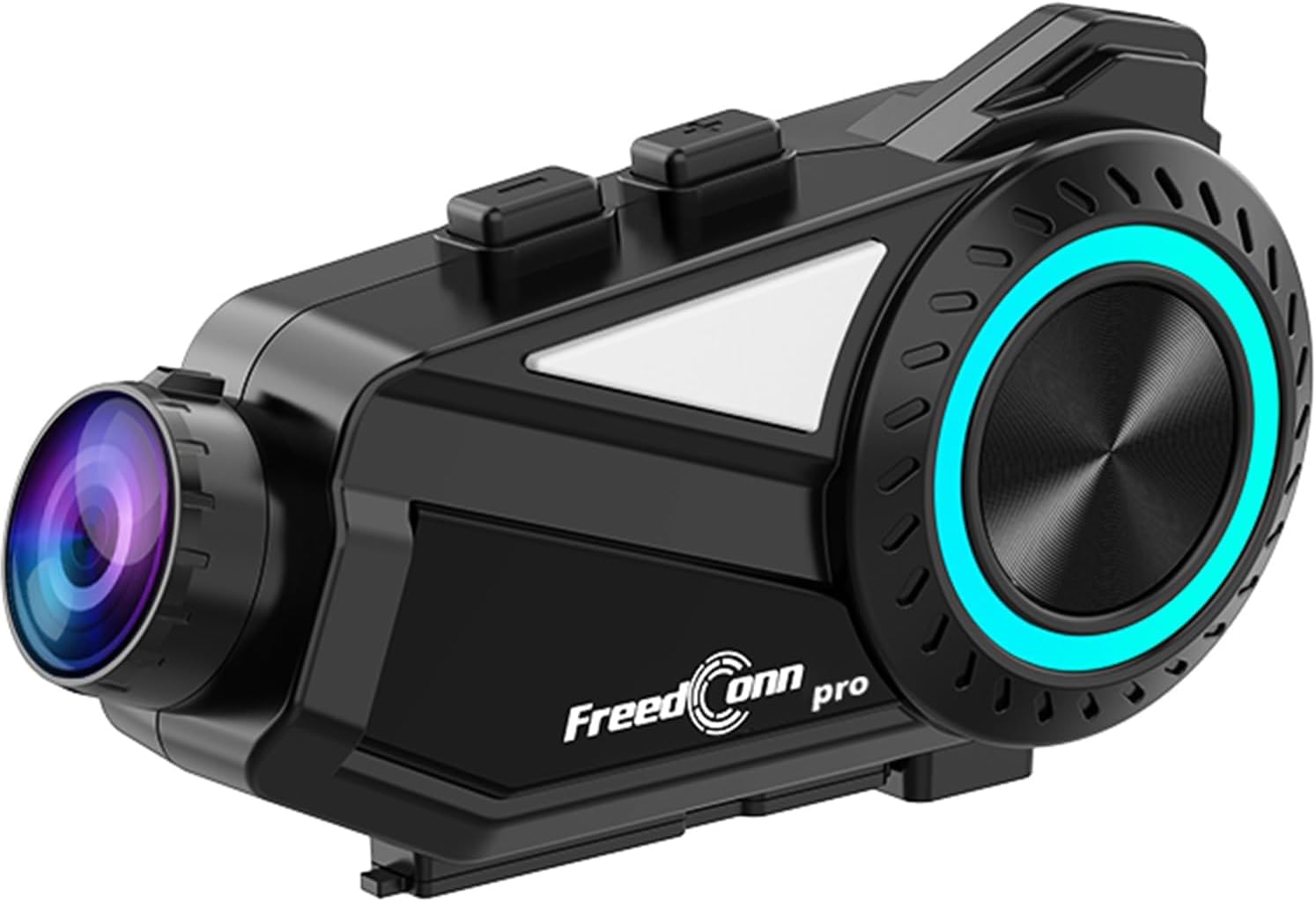
A sleek, black FreedConn R3Pro motorcycle intercom unit, featuring a camera lens on one end and a control dial with blue LED illumination on the side. It is designed to attach to a motorcycle helmet.
Бүтээгдэхүүн дууссанview
Гол онцлогууд
- Bluetooth 5.1 холболт: High-speed chip for stable connections, supporting HFP/HSP/A2DP protocols.
- Бүлгийн интерком: Supports up to 6 riders simultaneously with a communication range of 1.2km.
- 2K Camera & Loop Recording: Captures clear 1440p video, with adjustable lens and 360-degree unit rotation. Supports up to 512GB memory cards.
- Нарийвчилсан дуу чимээг арилгах: CVC and DSP/C technologies reduce wind and engine noise for clear audio up to 120km/h.
- Удаан эдэлгээтэй батерей: 2000mAh battery provides up to 45 hours of talk time and 7 hours of continuous recording.
- Dedicated Mobile App: "RoadCam" app for real-time video viewing and downloading via Wi-Fi.
- FM радио: Built-in FM radio function for entertainment and information.
- Дуут туслахын дэмжлэг: One-touch activation for hands-free control.
- IP65 Ус, тоос нэвтэрдэггүй: Цаг агаарын янз бүрийн нөхцөлд тэсвэртэй байхаар бүтээгдсэн.
- Бүх нийтийн хослолт: Compatible with other intercom brands (FODSPORTS, SENA) and various Bluetooth devices.
Багцын агуулга

This image displays the contents of the FreedConn R3Pro package, including the Bluetooth kit, 2-in-1 soft & hard microphones, hook clip, velcro clip, headphone velcro, USB cable, and manual. Below, a seven-step visual guide illustrates how to install the intercom unit onto a motorcycle helmet.
The FreedConn R3Pro package typically includes:
- FreedConn R3Pro Intercom Unit
- 2-in-1 Soft & Hard Microphones
- Helmet Mounting Kit (Hook Clip, Velcro Clip)
- Чихэвчний Velcro дэвсгэр
- USB цэнэглэгч кабель
- Хэрэглэгчийн гарын авлага
Бүрэлдэхүүн хэсгийн диаграм

A detailed diagram of the FreedConn R3Pro unit, highlighting its various buttons and ports. Labels indicate the camera, WiFi button, recorder power ON/OFF, record/pause button, multi-function button, Bluetooth ON/OFF/intercom button, LED indicator, volume/next track, volume/previous track, microphone, earphone jack, reset button, TF card slot, and charging/USB port.
Familiarize yourself with the buttons and ports on your R3Pro unit:
- Камер: Integrated 2K camera lens.
- WiFi товчлуур: Activates Wi-Fi for app connection.
- Recorder Power ON/OFF / Record/Pause Button: Controls camera recording.
- Олон үйлдэлт товчлуур: Used for various controls including pairing and voice assistant.
- Bluetooth ON/OFF / Intercom Button: Manages Bluetooth and intercom functions.
- LED үзүүлэлт: Төхөөрөмжийн статусыг харуулна.
- Volume / Next Track: Adjusts volume and skips tracks.
- Volume / Previous Track: Adjusts volume and goes to previous tracks.
- Микрофон порт: Connects the external microphone.
- Чихэвчний залгуур: Connects the helmet speakers.
- Дахин тохируулах товч: For device reset.
- TF картын оролт: For inserting a microSD card for recording.
- Charging / USB Port: Цэнэглэх, өгөгдөл дамжуулах зориулалттай.
Тохиргоо
1. Дуулга суурилуулах
Follow these steps to securely install the R3Pro unit on your motorcycle helmet:
- Attach the hook clip or velcro clip to the side of your helmet.
- Mount the R3Pro unit onto the attached clip.
- Insert the microphone into the helmet's interior, positioning it near your mouth.
- Attach the speakers inside the helmet using the provided velcro pads, ensuring they are aligned with your ears.
- Connect the microphone and speaker cables to the corresponding ports on the R3Pro unit.
2. Initial Pairing (Bluetooth)

An illustration showing the internal Bluetooth 5.1 chip of the FreedConn R3Pro, emphasizing high-speed communication, energy saving, low latency, and ultra-stability. An inset image demonstrates the multi-function button used for automatic pairing after the initial setup.
The R3Pro features automatic pairing after the first successful connection:
- Ensure your R3Pro unit is charged.
- Turn on the R3Pro unit.
- Ухаалаг утас эсвэл бусад төхөөрөмж дээрээ Bluetooth-г идэвхжүүлнэ үү.
- хайх "FreedConn R3Pro" in your device's Bluetooth settings and select it to pair.
- Once paired, the unit will automatically connect to your device when powered on.
3. App Connection (RoadCam)

This image illustrates the loop recording capability of the R3Pro and its integration with the "RoadCam" smartphone application. A motorcycle rider is shown, with the app interface on a phone displaying real-time video footage, indicating that recorded videos can be viewed and downloaded via Wi-Fi.
To connect to the dedicated "RoadCam" app:
- Download the "RoadCam" app from your smartphone's app store.
- Turn on the R3Pro unit and activate its Wi-Fi function (refer to the component diagram for the Wi-Fi button).
- Connect your smartphone to the R3Pro's Wi-Fi network (SSID and password usually found in the manual or on the device).
- Open the "RoadCam" app to view real-time video, manage recordings, and download files.
Ашиглалтын заавар
Асаах/унтраах
- Асаах: Press and hold the Power button (refer to component diagram) until the LED indicator lights up.
- Унтраах: LED индикатор унтрах хүртэл Power товчийг дараад барина уу.
Домофон холбоо

An image depicting multiple motorcycle riders on a road, connected wirelessly by the FreedConn R3Pro intercoms. It highlights the automatic communication reconnection feature, allowing riders to rejoin the conversation seamlessly even if they temporarily separate up to 1.2km.
- Интеркомыг эхлүүлэх: Press the Intercom button to start a conversation with paired units.
- Бүлгийн интерком: The R3Pro supports up to 6 riders for simultaneous communication. Follow the specific pairing instructions in the full manual for multi-unit connections.
- Автомат дахин холболт: If riders separate and exceed the 1.2km range, the units will automatically reconnect once they are back within range.
Камерын ажиллагаа

This image demonstrates the adjustable camera features of the FreedConn R3Pro. It shows the camera lens can be adjusted by 30 degrees and the main unit can rotate 360 degrees, allowing riders to capture various angles.
- Бичлэг эхлүүлэх/ зогсоох: Press the Record/Pause button (refer to component diagram) to start or stop video recording.
- Давталтын бичлэг: Камер нь давталттай бичлэгийг дэмждэг бөгөөд хамгийн хуучин бичлэгийг автоматаар дарж бичдэг fileсанах ойн карт дүүрсэн үед.
- Камерын тохируулга: The camera lens can be adjusted by 30 degrees, and the entire unit can rotate 360 degrees for optimal viewөнцөг.
- Санах ойн карт: Insert a microSD card (up to 512GB) into the TF card slot before recording.
Music Playback & Sharing

This image illustrates the R3Pro's universal pairing with various Bluetooth devices like smartphones, action cameras, and other Bluetooth earphones. It also shows two riders sharing music, emphasizing the ability to enjoy favorite tunes with a partner.
- Тоглуулах/түр зогсоох: Use the multi-function button for music control.
- Дараагийн / Өмнөх бичлэг: Use the Volume/Next Track and Volume/Previous Track buttons.
- Хөгжим хуваалцах: Share audio with a paired intercom unit up to 50 meters away.
FM радио

A motorcycle rider is shown with the R3Pro, indicating the built-in FM radio feature. The image displays a frequency range from 76-108MHz, suggesting support for Japanese frequencies, and mentions support for sports broadcasts and news.
- FM радиог идэвхжүүлэх: Press the designated FM radio button (refer to the full manual for specific button assignment).
- Сувгуудыг сканнердах: The unit will automatically scan and save available FM stations.
- Сувгийг өөрчлөх: Use the Volume/Next Track and Volume/Previous Track buttons to switch between stations.
Утасны дуудлага

An image showing a motorcycle rider receiving a call, with a graphic indicating automatic answering after 15 seconds of no operation. It also states that hands-free calls are possible while riding, and music playback resumes after the call ends.
- Дуудлагад хариулах: The R3Pro supports automatic answering after 15 seconds of no operation. You can also tap the multi-function button to answer.
- Дуудлага дуусгах: Tap the multi-function button to end a call.
- Дуудлагаас татгалзах: Ирж буй дуудлагаас татгалзахын тулд олон үйлдэлт товчлуурыг удаан дар.
- Dual Phone Connection: The unit can connect to two smartphones simultaneously, allowing real-time switching between call, music, and navigation functions.
Дуут туслах

An illustration showing how to activate the voice assistant by long-pressing the multi-function button for 2 seconds. Examples of voice commands are displayed, such as "хайх gas station," "Call Mr. Matsumoto," "What day is today?", and "How's the weather tomorrow?".
To activate your smartphone's voice assistant (e.g., Siri, Google Assistant):
- Идэвхжүүлэх: Олон үйлдэлт товчлуурыг 2 секундын турш дарна уу.
- Once activated, you can issue commands for navigation, calls, weather checks, and more.
Дуу чимээг арилгах

A diagram illustrating the effect of noise cancellation, showing sound waves before and after processing, with a significant reduction in noise. It also displays the internal components of the speaker, highlighting Hi-Res audio quality and an omnidirectional microphone for clear conversations up to 120km/h.
The R3Pro features advanced CVC and DSP/C noise cancellation technology, which automatically reduces ambient noise such as wind and engine sounds. This ensures clear voice communication and high-quality music playback even at speeds up to 120km/h.
Засвар үйлчилгээ
Батерейг цэнэглэж байна

Зургийн шоуasing the 2000mAh battery of the R3Pro, indicating approximately 2.5 hours for a full charge. It highlights extended usage times: 42 hours for music, 33 hours for talk, and 7-8 hours for recording, with support for up to 512GB memory cards for loop recording.
- Connect the R3Pro to a power source using the provided USB charging cable via the Charging/USB Port.
- Бүрэн цэнэглэхэд ихэвчлэн 2.5 цаг зарцуулдаг.
- LED үзүүлэлт нь цэнэглэх төлөвийг харуулах болно (жишээлбэл, цэнэглэж байгаа бол улаан, бүрэн цэнэглэгдсэн бол цэнхэр).
Цэвэрлэгээ ба арчилгаа

An image showing the FreedConn R3Pro unit being splashed with water, illustrating its IP65 waterproof and dustproof rating. This indicates stable communication and recording are possible even in sudden rain or bad weather conditions.
- Төхөөрөмжийг зөөлөн арчиж арчихamp даавуу. Хүчтэй химийн бодис, зүлгүүрийн цэвэрлэгч хэрэглэж болохгүй.
- Дагалдах хэрэгслийг цэнэглэх эсвэл холбохын өмнө бүх портууд хуурай байгаа эсэхийг шалгаарай.
- The IP65 rating protects against water jets and dust, but avoid submerging the unit in water.
Алдааг олж засварлах
Нийтлэг асуудал ба шийдэл
| Асуудал | Боломжит шалтгаан | Шийдэл |
|---|---|---|
| Төхөөрөмж асахгүй байна | Low battery; Faulty power button | Charge the unit fully; Contact support if issue persists. |
| Ухаалаг утастай хослуулах боломжгүй | Bluetooth not enabled; Unit not in pairing mode; Interference | Ensure Bluetooth is on; Put R3Pro in pairing mode; Move away from other devices; Reset unit. |
| Домофон холбоогүй байна | Units out of range; Incorrect pairing sequence; Low battery | Ensure units are within 1.2km; Re-pair units; Charge batteries. |
| Дууны чанар муу/дуу чимээ | Microphone/speaker placement; High wind noise; Interference | Adjust microphone/speaker; Ensure CVC/DSP is active; Check for obstructions. |
| Камер бичлэг хийхгүй байна | No microSD card; Full microSD card; Card error | Insert/replace microSD card; Format card; Check card compatibility. |
| Апп холболтын асуудал | Wi-Fi not enabled on R3Pro; Incorrect Wi-Fi password; App not updated | Enable R3Pro Wi-Fi; Re-enter password; Update RoadCam app. |
If you encounter issues not listed here or if the suggested solutions do not resolve the problem, please refer to the comprehensive troubleshooting section in the full user manual or contact customer support.
Үзүүлэлтүүд
| Онцлог | Дэлгэрэнгүй |
|---|---|
| Брэнд | FreedConn |
| Загварын нэр | R3PRO |
| Холболтын технологи | Bluetooth 5.1, Wi-Fi |
| Домофон холбооны хүрээ | Up to 1.2 km (multi-person) |
| Бүлгийн харилцаа холбоо | Up to 6 riders simultaneously |
| Видео бичлэгийн нягтрал | 1440p (2К) |
| Камерын онцлог | 30-degree lens adjustment, 360-degree unit rotation, Loop Recording |
| Санах ойн картны дэмжлэг | 512GB хүртэл microSD |
| Дуу чимээг арилгах | CVC, DSP/C |
| Зайны багтаамж | 2000 мАч лити ион |
| Тасралтгүй ярианы цаг | 45 цаг хүртэл |
| Тасралтгүй бичлэг хийх хугацаа | Ойролцоогоор 7 цаг |
| Цэнэглэх хугацаа | Ойролцоогоор 2.5 цаг |
| Усны хамгаалалттай үнэлгээ | IP65 |
| Хэмжээ | 14.8 x 11.5 x 6.4 см |
| Жин | 450 гр |
Баталгаат болон дэмжлэг
The FreedConn R3Pro comes with a 1 жилийн баталгаат хугацаа худалдан авсан өдрөөс эхлэн үйлдвэрлэлийн согогийг хамарна. Баталгаат заргад зориулж худалдан авалтаа нотлох баримтаа үлдээнэ үү.
For technical support, troubleshooting assistance, or warranty inquiries, please contact FreedConn customer service through the retailer where you purchased the product or visit the official FreedConn webхолбоо барих мэдээлэл авах сайт.


