1. Танилцуулга
The GODIYMODULES SMC05 is an integrated stepper and servo motor driver controller designed for precise control of motor rotation, speed, and angle. Featuring a 1.8-inch color screen and intuitive knob operation, this module supports a wide range of applications requiring accurate motor positioning and speed regulation. It offers multiple control modes and communication options for versatile integration into various systems.
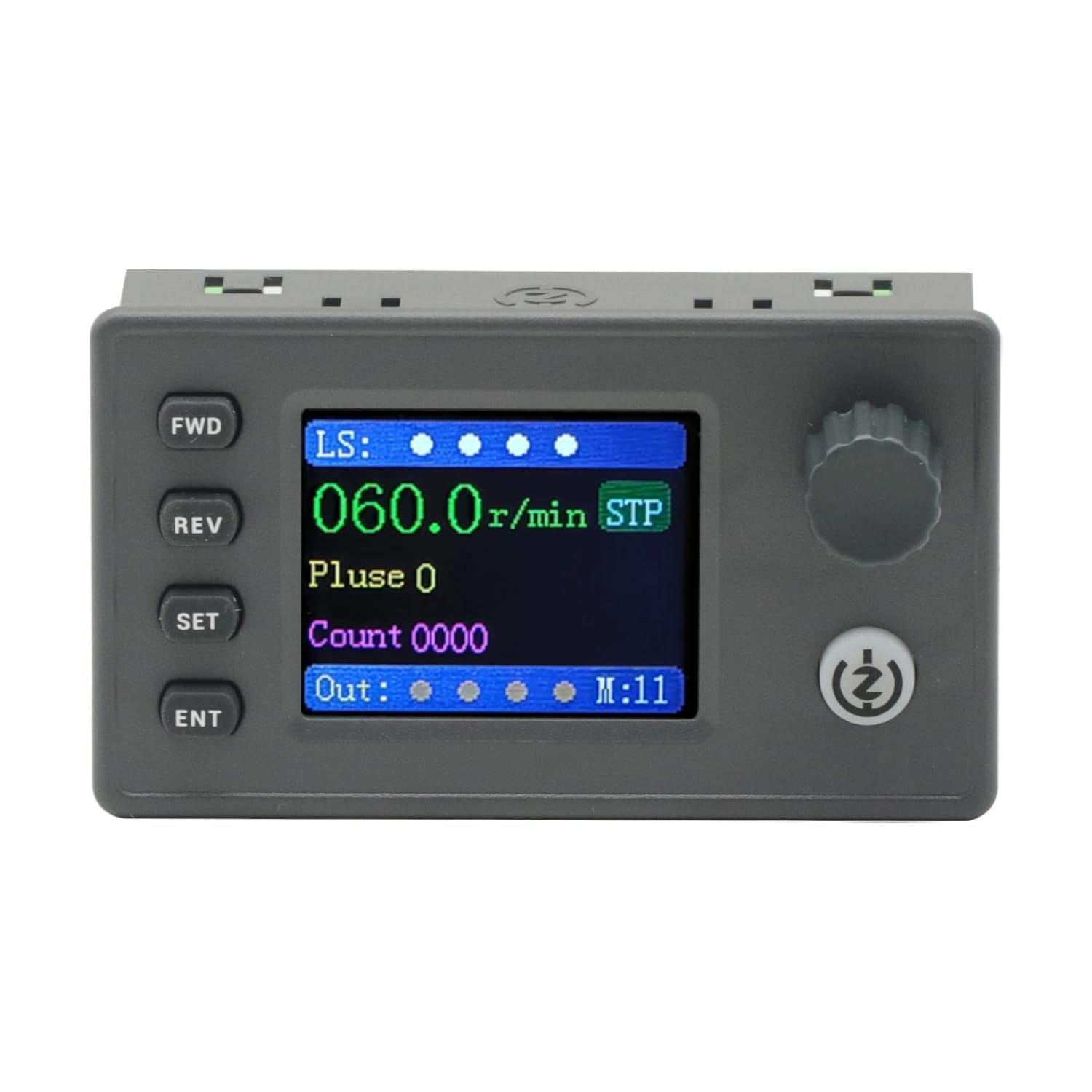
Figure 1: The SMC05 Stepper/Servo Motor Driver Controller, highlighting its 1.8-inch color screen, knob operation, and shortcut buttons.
2. Бүтээгдэхүүний онцлог
- Нэгдсэн хяналт: Combines stepper motor driver and servo motor control functionalities.
- Өргөн ботьtage хүрээ: Operates with a working voltage 12-24 В.
- Компакт дизайн: Product dimensions are 83x48x35.5mm.
- Гаралтын дохио: Features 4 output channels with 0V output voltage.
- Оролтын дохио: Includes 4 limit inputs and 3 extended key interfaces.
- High Pulse Frequency: Supports motor pulse frequencies from 1Hz to 200,000Hz.
- Өнгөт дэлгэц: Equipped with a 1.8-inch color screen for clear information display.
- Pulse Voltage: Motor pulse voltage is 0V output, collector output form.
- Харилцаа холбоо: Supports Modbus protocol via serial port/485.
- Олон горимууд: Supports 20 different motion control modes.
- Хэлний дэмжлэг: Display in both Chinese and English.

Figure 2: Key features of the SMC05 controller, including support for various modes and input/output capabilities.
3. Тохиргоо ба суурилуулалт
3.1 Power Supply and Connections
Ажлын эзлэхүүнийг хангахtage is within the specified range of 12-24V DC. Connect the power supply to the designated terminals. The controller features various input and output interfaces for connecting limit switches, expansion buttons, and motor drives.

Зураг 3: Нарийвчилсан view of the SMC05 controller's extension interface, indicating connections for power, limit switches, expansion buttons, communication, and motor outputs.
3.2 Моторын утас
Proper wiring of the stepper or servo motor drive is crucial for correct operation. Refer to the wiring diagrams provided to ensure all connections are secure and correctly aligned with the motor and power source.

Зураг 4: Жишээ ньample wiring diagram for connecting the SMC05 controller to a microstep driver and a stepper motor.
4. Ашиглалтын заавар
The SMC05 controller features a user-friendly interface with a 1.8-inch color screen, a rotary knob, and several control buttons for easy operation and parameter adjustment.
4.1 Хяналтын самбар дээрview

Figure 5: Front panel layout of the SMC05 controller with labels for all buttons, the rotary knob, and display indicators.
- FWD Button: Initiates forward rotation.
- REV товчлуур: Initiates reverse rotation.
- SET товчлуур: Enters the settings menu or exits current settings.
- ENT Button: Сонголтыг баталгаажуулах эсвэл дэд цэс рүү орно.
- Ротари бариул: Adjusts parameters such as speed, pulse count, and navigates menus.
- Эхлэх/зогсоох товч: Starts or stops motor operation.
- Дэлгэц: Shows current speed, pulse count, motion mode, and various indicators.
4.2 Үндсэн үйл ажиллагаа
- Асаах: Connect the 12-24V DC power supply. The screen will light up.
- Параметрүүдийг тохируулах: дээр дарна уу SET button to enter the settings menu. Use the rotary knob to navigate through options like Үйлдэл, Мотор, ба Систем. дарна уу ENT сонгох.
- Adjusting Speed/Pulse: дотор Үйлдэл or Мотор settings, you can adjust parameters such as forward pulse, forward speed, reverse pulse, and reverse speed using the rotary knob.
- Starting Motor: Once parameters are set, press the Эхлэх/ зогсоох button to begin motor operation. The motor will rotate according to the configured speed and direction.
- Чиглэл өөрчлөх: -г ашиглана уу FWD болон REV buttons to change the motor's rotation direction during operation.
- Stopping Motor: дээр дарна уу Эхлэх/ зогсоох button again to halt motor movement.
4.3 Advanced Features Demonstration
The following video demonstrates various operational aspects and advanced features of the SMC05 controller, including interface navigation, stepper motor control, use of expansion buttons, limit switches, and output control, as well as servo motor drive integration.
Video 1: Demonstration of the SMC05 controller's interface, stepper motor drive, expansion button functionality, limit switch activation, output control, and servo motor drive operation.
5. Техникийн үзүүлэлтүүд
| Онцлог | Тодорхойлолт |
|---|---|
| Бүтээгдэхүүний хэмжээс | 3.27 x 1.89 x 1.4 инч (83x48x35.5мм) |
| Зүйлийн жин | 3.27 унц |
| Ажлын ботьtage | 12-24V тогтмол гүйдэл |
| Гаралтын дохио | 4 channels, 0V output voltage |
| Оролтын дохио | 4 limit inputs, 3 extended key interfaces |
| Motor Pulse Frequency | 1 Гц - 200,000 Гц |
| Дэлгэцийн төрөл | 1.8 инчийн өнгөт дэлгэц |
| Motor Pulse Voltage | 0V output, collector output form |
| Харилцааны протокол | Modbus (serial port/485) |
| Оруулсан бүрэлдэхүүн хэсгүүд | 1PCS SMC05 Controller |
6. Засвар үйлчилгээ
To ensure the longevity and optimal performance of your SMC05 controller, follow these maintenance guidelines:
- Төхөөрөмжийг цэвэр, тоос шороо, хог хаягдлаас хол байлга. Цэвэрлэхийн тулд зөөлөн, хуурай даавуу ашиглана уу.
- Хянагчийг хэт өндөр температур, чийгшил эсвэл нарны шууд тусгалд өртөхөөс зайлсхий.
- Ensure all connections are secure and free from corrosion. Periodically check wiring for any signs of wear or damage.
- c-г нээх гэж бүү оролдasing or modify the internal components, as this may void the warranty and cause damage.
7. Алдаа засах
If you encounter issues with your SMC05 controller, refer to the following common troubleshooting steps:
- Эрчим хүчгүй: Цахилгаан тэжээлийн холболтыг шалгаж, зөв дуусгах боломжтой эсэхийг шалгана ууtage (12-24V DC). Verify the power adapter is functioning.
- Мотор хөдөлдөггүй:
- Ensure the motor is correctly wired to the driver and the driver to the controller.
- Check if the motor parameters (speed, pulse) are set correctly on the controller.
- Verify that the Start/Stop button has been pressed to initiate movement.
- Check for any active limit switch inputs that might be preventing movement.
- Incorrect Speed/Direction: Review the speed and direction settings in the controller's menu. Ensure the FWD/REV buttons are used appropriately.
- Дэлгэцийн асуудлууд: If the screen is blank or shows errors, try restarting the device. If the problem persists, contact support.
- Communication Errors (Modbus): Verify the serial port/485 connections and ensure the communication parameters (baud rate, parity, etc.) are correctly configured on both the controller and the connected device.
For persistent issues not resolved by these steps, please contact GODIYMODULES customer support.
8. Баталгаат хугацаа ба дэмжлэг
Information regarding specific warranty terms for the GODIYMODULES SMC05 controller is not available in the provided product data. Please refer to the product packaging or the manufacturer's official webбаталгааны дэлгэрэнгүй мэдээллийг авах сайт.
For technical support, troubleshooting assistance, or inquiries about the product, please contact GODIYMODULES customer service through their official channels.

