1. Танилцуулга
The LILYGO T-Echo Plus is a versatile LoRa development board designed for long-range, low-power wireless communication. It integrates a 1.54-inch SPI E-Paper display, GPS capabilities, and various sensors, making it suitable for a wide range of applications including community networking, outdoor adventures, and emergency communications. This manual provides essential information for setting up, operating, and maintaining your T-Echo Plus device.
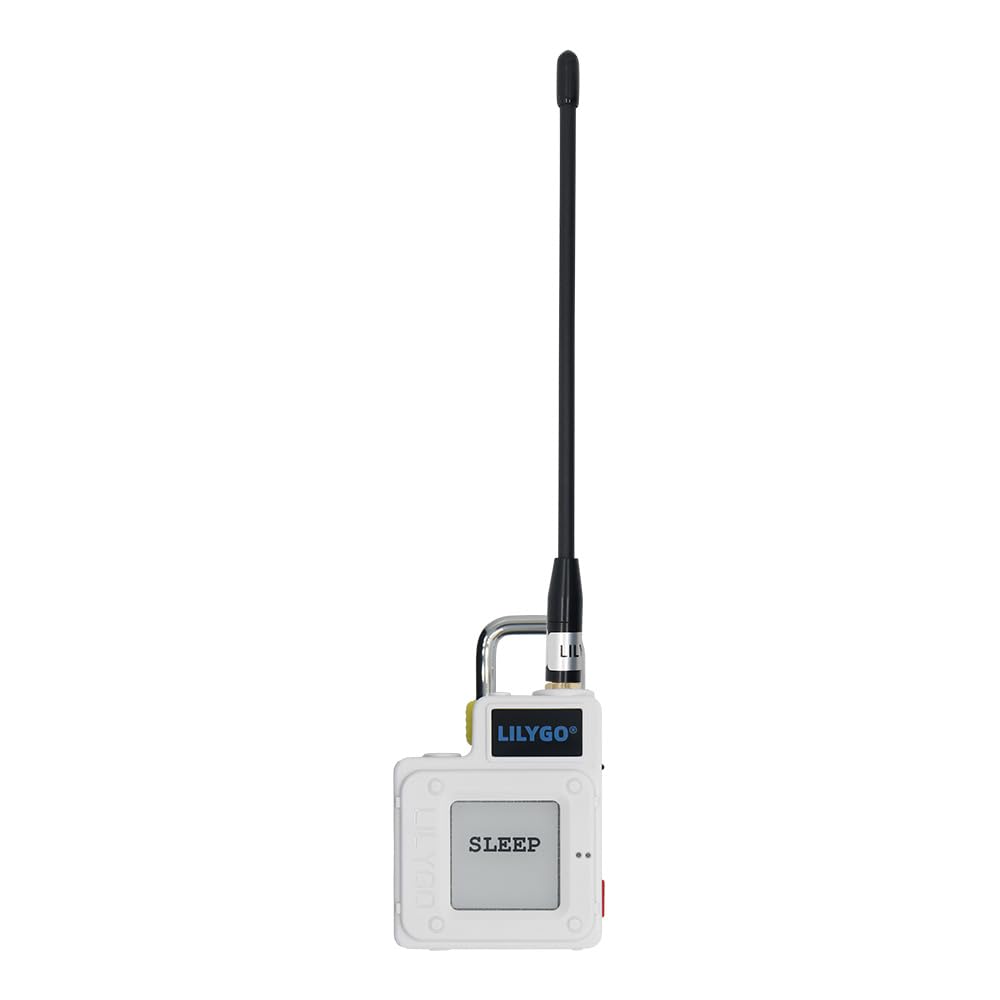
Figure 1: LILYGO T-Echo Plus LoRa Development Board.
2. Бүтээгдэхүүний онцлог
The T-Echo Plus comes equipped with several advanced features to enhance its functionality and user experience:
- BHl260AP IMU: Integrated Inertial Measurement Unit for motion sensing.
- Чичиргээний мотор: Provides tactile feedback for notifications and alerts.
- 2400 мАч батерей: High-capacity battery for extended operation.
- Буззер: Audible alerts for various events.
- GPS, GLONASS, BeiDou, QzSS Support: Multi-system positioning GNSS module for accurate location tracking.
- 1.54 inch SPI E-Paper Display: Grey level 2 display with 200x200 resolution and 2-second full refresh time, offering low power consumption and clear visibility.
- SX1262 LoRa Transceiver: Long-range, low-power communication with global frequency coverage (400-520 MHz, 830-945 MHz).
- nRF52840 MCU: Features Bluetooth 5, Thread, Bluetooth Mesh, ANT, 802.15.4, Zigbee connectivity.

Figure 2: Technical specifications and new features of LILYGO T-Echo Plus.

Figure 3: LILYGO T-Echo Plus Battery Pack Pinmap and component overview.
3. Тохиргоо
3.1 Анхны чуулган
- Антен холбох: Carefully screw the provided antenna into the SMA connector on the device. Ensure it is finger-tight to avoid damage.
- Асаах: The device typically powers on by pressing a designated button or switch. Refer to the device's physical layout for the exact power control.
3.2 Програм хангамж ба холболт
- Meshtastic App: Download and install the Meshtastic application on your smartphone. This app facilitates communication and device configuration via Bluetooth.
- Програм хангамж: The device comes pre-flashed with firmware. For updates or custom firmware, connect the device to a computer via its USB-C port. Refer to the official LILYGO GitHub repository for detailed flashing instructions and available firmware versions.
Video 1: This video demonstrates the LILYGO T-Echo-Lite LoRa board, showing its compact size, e-ink screen, and the core components. It highlights the transparent case and the L76K GPS module (optional).
4. Ашиглалтын заавар
4.1 Үндсэн үйл ажиллагаа
- Мессеж илгээх: Connect your T-Echo Plus to the Meshtastic app on your phone via Bluetooth. Use the app to compose and send text messages. The device will relay these messages over the LoRa mesh network.
- Мессеж хүлээн авах: Incoming messages will be displayed on the 1.54-inch E-Paper screen and can also be viewed within the Meshtastic app.
- Дэлгэцийн навигаци: Use the physical buttons on the device to navigate through different screens or menus on the E-Paper display.
- Арын гэрэлтүүлгийн тохируулга: If applicable, adjust the screen backlight using the designated controls for better visibility in various lighting conditions.
- SOS функц: In an emergency, a specific button press sequence (e.g., triple click) may trigger an SOS alarm signal, utilizing the buzzer and vibration motor.
4.2 Торон сүлжээ
The T-Echo Plus operates on a mesh network, meaning each device can relay messages from other devices, extending the overall communication range. The more devices in an area, the wider and more robust the network becomes. Messages can be sent encrypted for privacy.
5. Засвар үйлчилгээ
- Цэнэглэж байна: Charge the device using a standard USB-C cable. The 2400mAh battery provides extended usage time.
- Програм хангамжийн шинэчлэлтүүд: Regularly check the LILYGO GitHub for the latest firmware updates to ensure optimal performance and access to new features. Follow the provided instructions for safe updating.
- Цэвэрлэгээ: Use a soft, dry cloth to clean the device and screen. Avoid using harsh chemicals or abrasive materials.
- Хадгалах: Store the device in a cool, dry place when not in use. If storing for extended periods, ensure the battery is partially charged (around 50%) to prolong its lifespan.
6. Алдаа засах
- Холболт байхгүй: Ensure the device is powered on and within Bluetooth range of your smartphone. Check the Meshtastic app for connection status.
- Муу хүрээ: LoRa range is affected by line of sight and obstacles. Try moving to a higher elevation or an area with fewer obstructions. Ensure the antenna is securely attached.
- Төхөөрөмж хариу өгөхгүй байна: Try restarting the device. If the issue persists, consult the LILYGO Wiki or GitHub for specific troubleshooting steps.
- Нэмэлт тусламж: For more detailed troubleshooting or technical support, refer to the official LILYGO Wiki (wiki.lilygo.cc) and GitHub repository (github.com/Xinyuan-LilyGO/T-Echo).
7. Техникийн үзүүлэлтүүд
| Онцлог | Дэлгэрэнгүй |
|---|---|
| Брэнд | ЛИЛИГО |
| Цуврал | T-Echo Plus |
| Загварын нэр | T-Echo Plus |
| Загварын дугаар | White without BME280 sensor |
| Үйлдлийн систем | Линукс |
| Процессорын брэнд | Эспрессиф |
| Процессорын тоо | 1 |
| Холболтын технологи | LoRa 915Mhz, GPS, GLONASS, BeiDou, QzSS |
| New Features (Plus Version) | BHl260AP IMU + Vibration Motor + 2400mAh Battery + Buzzer |
| Дэлгэц | 1.54 inch SPI E-Paper Display |
8. Хайрцагт юу байна
Your LILYGO T-Echo Plus package includes:
- LILYGO T-Echo Plus LoRa Development Board
- Антен
- Хамгаалалтын хайрцаг
- Хэрэглэгчийн гарын авлага

Figure 4: LILYGO T-Echo Plus device inside its protective case.
9. Баталгаат хугацаа ба дэмжлэг
LILYGO is committed to providing excellent product service. If you have any questions or suggestions about the product, please feel free to contact us. We will answer your question as soon as possible.
For additional resources, including detailed documentation, tutorials, and community forums, please visit:
- Албан ёсны Вики: wiki.lilygo.cc
- GitHub Repository: github.com/Xinyuan-LilyGO/T-Echo


