1. Танилцуулга
The NOYAFA NF-8518 is a multifunctional network cable tester designed for comprehensive network and fiber optic testing. It integrates nine core functions to assist with various cabling projects, network troubleshooting, and equipment maintenance. This device is suitable for network engineers, IT professionals, and maintenance personnel, offering precise cable scanning, fault localization, and power measurement capabilities.
2. Үндсэн шинж чанарууд
- Multifunctional Testing: Includes cable continuity testing, cable scanning, port flashing, length measurement, PoE power supply testing, optical power meter, and NCV functionality.
- Оптик эрчим хүчний тоолуур: Supports precise multi-wavelength measurements (850nm, 1300nm, 1310nm, 1490nm, 1550nm, 1625nm) with a power detection range of -70 dBm to +10 dBm. Compatible with FC/SC/ST connectors (adapters may require separate purchase).
- PoE Port Blinking Test: Accurately detects power polarity, voltage, and power supply status of PoE network switches, supporting 10M/100M/1000M modes and up to 60VDC.
- Харааны алдаа илрүүлэгч (VFL): High-efficiency function for identifying fiber optic breaks, poor connections, bends, or cracks with 650nm wavelength.
- Port Blinking & Cable Length Testing: Quickly locates network cables and ports, displays operating speed and duplex mode. Measures network, telephone, and BNC cable lengths up to 200 meters with an accuracy of ±1.6 meters.
- LED Lighting & Non-Contact Voltage (NCV): Features a built-in flashlight for low-light environments and NCV testing for household wiring.
- Батерейны урт наслалт: Built-in 1500mAh 3.7V lithium battery provides up to 10 hours of operation and supports Type-C charging.
3. Product Components & Overview
The NF-8518 kit includes the main transmitter unit and a receiver unit, along with necessary accessories. Below is an overview of the main unit's buttons and ports.

Figure 3.1: NOYAFA NF-8518 Transmitter and Receiver Overview
Хайрцагт юу байгаа вэ:
- NOYAFA NF-8518 Network Cable Tester Transmitter
- NOYAFA NF-8518 Network Cable Tester Receiver
- Хэрэглэгчийн гарын авлага
- C төрлийн цэнэглэгч кабель
- RJ11 Adapter Line
- RJ45 Adapter Line
- Кабелийн адаптерууд
- Багажны цүнх
4. Тохиргоо
4.1 Төхөөрөмжийг цэнэглэх
Before initial use, ensure both the transmitter and receiver units are fully charged. Connect the provided Type-C charging cable to the charging port on each unit and a suitable USB power adapter. The battery indicator on the display will show the charging status.

Figure 4.1: Charging the NF-8518 Units
4.2 Асаах/унтраах
Press and hold the power button on each unit to turn it on or off. The main unit features a color LCD display, while the receiver has LED indicators.
5. Ашиглалтын заавар
The NF-8518 offers various testing modes accessible via the main unit's menu. Use the navigation buttons (Up, Down, Left, Right, OK) to select functions.
5.1 Cable Tracking (SCAN/TEST)
This function helps locate target cables within bundles. Connect the cable to be traced to the main unit's SCAN/CONT port. Select the 'TEST' or 'SCAN' function from the menu. Use the receiver to scan the cables; it will emit audible beeps and show visual signals when near the target cable. Adjust sensitivity for precise localization.
Video 5.1: Cable Tracking Demonstration

Figure 5.1: Cable Tracer in Use
5.2 Cable Continuity Testing (CONT)
This function checks for short circuits, open circuits, and crossovers in network cables. Connect one end of the cable to the main unit's SCAN/CONT port and the other end to the receiver's RJ45 port. Select 'CONT' from the menu. The display will show the wiring status, indicating any faults.

Figure 5.2: Continuous Cable Testing
5.3 Портын анивчлага (FLASH)
To quickly identify a network port on a switch or router, connect the cable to the transmitter's 'Length/Flash' port. Select the 'Flash' function from the main menu. The indicator light on the corresponding port of the network device will blink, allowing for easy identification. This function supports 10M/100M/1000M speeds.

Figure 5.3: Port Flashing Function
5.4 Кабелийн уртын хэмжилт (УРТ)
Measure the length of network cables, telephone lines, and BNC cables. Connect one end of the cable to the main unit's 'Length/Flash' port. Select the 'Length' function and initiate the test. The device will display the cable length and identify any breaks within a 200-meter range.

Figure 5.4: Cable Length Measurement
5.5 PoE Testing (POE)
Test Power over Ethernet (PoE) devices and switches. Connect the network cable from the PoE source to the main unit's 'Length/Flash' port. Select the 'PoE' function. The device will display the power polarity, voltage, and power supply status (standard/non-standard, Endspan/Midspan).

Figure 5.5: PoE Testing Interface
5.6 QC Test (RJ45 Connector Quality Control)
This function verifies the correct functioning of RJ45 connectors. Insert the RJ45 connector into the 'QC' port on the side of the main unit. Select 'QC Test' from the menu. The display will show whether each pin connection is normal or faulty.

Figure 5.6: RJ45 QC Test
5.7 Харааны алдаа илрүүлэгч (VFL)
The VFL function helps identify faults in fiber optic cables. Remove the protective cap from the VFL port (located near the OPM port) and connect the fiber optic cable. Select 'VFL' from the menu. A visible red laser light will be emitted. Observe the fiber for light leakage, which indicates breaks or damage. The VFL supports fast flashing, slow flashing, and continuous illumination modes.

Figure 5.7: Visual Fault Locator in Action
5.8 Оптик эрчим хүчний тоолуур (OPM)
Measure the optical power of fiber optic signals. Connect the fiber optic cable to the OPM port. Select 'OPM' from the menu. The device will automatically identify the fiber optic frequency and display the power measurement in dBm across various wavelengths (850nm, 1300nm, 1310nm, 1490nm, 1550nm, 1625nm, 1650nm).
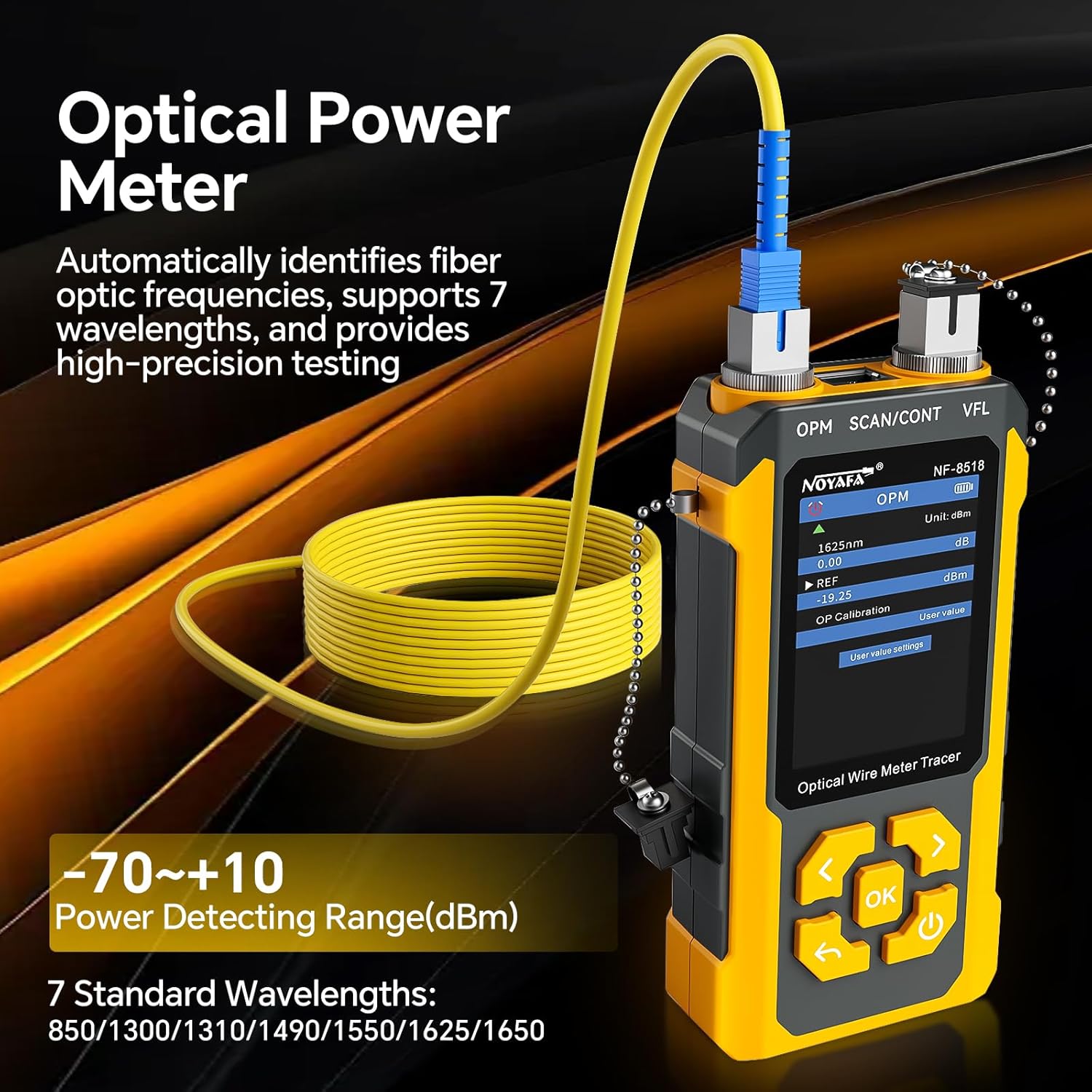
Figure 5.8: Optical Power Meter Interface
5.9 Холбоо барихгүй ботьtage (NCV)
The receiver unit features a Non-Contact Voltage (NCV) detection function. Press the NCV button on the receiver and bring the tip close to household wiring or power outlets. The NCV light will illuminate and an audible alert will sound if voltage is detected, allowing for safe identification of live wires.
Figure 5.9: NCV Function
5.10 LED гэрэлтүүлгийн функц
The receiver unit includes an LED flashlight for working in dimly lit environments. Press the dedicated LED button on the receiver to turn the flashlight on or off.
Video 5.2: Comprehensive Function Overview
6. Засвар үйлчилгээ
6.1 Цэвэрлэгээ
Wipe the device with a soft, dry cloth. Do not use abrasive cleaners or solvents. Ensure ports are free of dust and debris, especially optical ports, to maintain measurement accuracy.
6.2 Батерейны арчилгаа
Recharge the device regularly, even if not in frequent use, to prolong battery life. Avoid fully discharging the battery for extended periods. Store the device in a cool, dry place.
6.3 Хадгалалт
When not in use, store the NF-8518 in its protective case to prevent damage from impacts or environmental factors.
7. Алдаа засах
- Төхөөрөмж асахгүй байна: Ensure the battery is charged. Connect the Type-C cable and attempt to power on while charging.
- Кабелийн уртын хэмжилт буруу байна: Verify the cable type setting is correct. Ensure the cable is properly connected and not damaged.
- No signal during cable tracking: Check if the cable is securely connected to the transmitter. Ensure the receiver is in SCAN mode and its sensitivity is adjusted appropriately.
- VFL not emitting light: Check if the VFL port is clean and the fiber optic cable is properly connected. Ensure the VFL function is selected and activated.
- OPM readings are unstable: Clean the OPM port and the fiber optic connector. Ensure the correct wavelength is selected if not automatically detected.
8. Техникийн үзүүлэлтүүд
| Онцлог | Тодорхойлолт |
|---|---|
| Загвар | NF-8518 |
| Optical Power Meter (OPM) Wavelengths | 850nm, 980nm, 1270nm, 1300nm, 1310nm, 1490nm, 1550nm, 1577nm, 1625nm, 1650nm |
| OPM хүрээ | -70-аас + 6dBm хүртэл |
| OPM Accuracy | ±0.5дБ |
| VFL Power | 10мВт |
| Cable Length Measurement Range | 5 - 350 м |
| PoE Power Supply Agreement | IEEE802.3 at/af, Non-Standard |
| PoE Power Supply Method | End Span/Mid Span/8-pin power connector |
| Порт Flash | Тиймээ |
| SCAN/CONT/Flash Port | RJ45 (Anti-burnt 60V) |
| Дамжуулагчийн батерей | 3.7V 1500mAh Polymer Lithium battery |
| Цэнэглэх порт | Төрөл-C |
| Дамжуулагчийн хэмжээс | 164 x 71 x 34 мм |
| Хүлээн авагчийн хэмжээ | 198 x 45 x 28 мм |
| Зүйлийн жин | 1.28 фунт (нийт багц) |
9. Баталгаат хугацаа ба дэмжлэг
NOYAFA products are designed for reliability and performance. For warranty information, technical support, or service inquiries, please refer to the contact details provided with your purchase or visit the official NOYAFA webсайт. Баталгаат зардлаа авахын тулд худалдан авалтын баримтаа хадгална уу.


