1. Танилцуулга
The Havit MS966SE is a high-performance tri-mode gaming mouse designed for versatility, precision, and comfort. It features a PixArt PMW3325 optical sensor, offering exceptional tracking accuracy and adjustable DPI settings up to 10,000. With its tri-mode connectivity, you can seamlessly switch between 2.4GHz wireless, Bluetooth 5.3, and USB-C wired modes to suit your gaming or work environment. The lightweight and ergonomic design ensures comfortable use during extended sessions, complemented by dynamic RGB lighting for a personalized aesthetic.

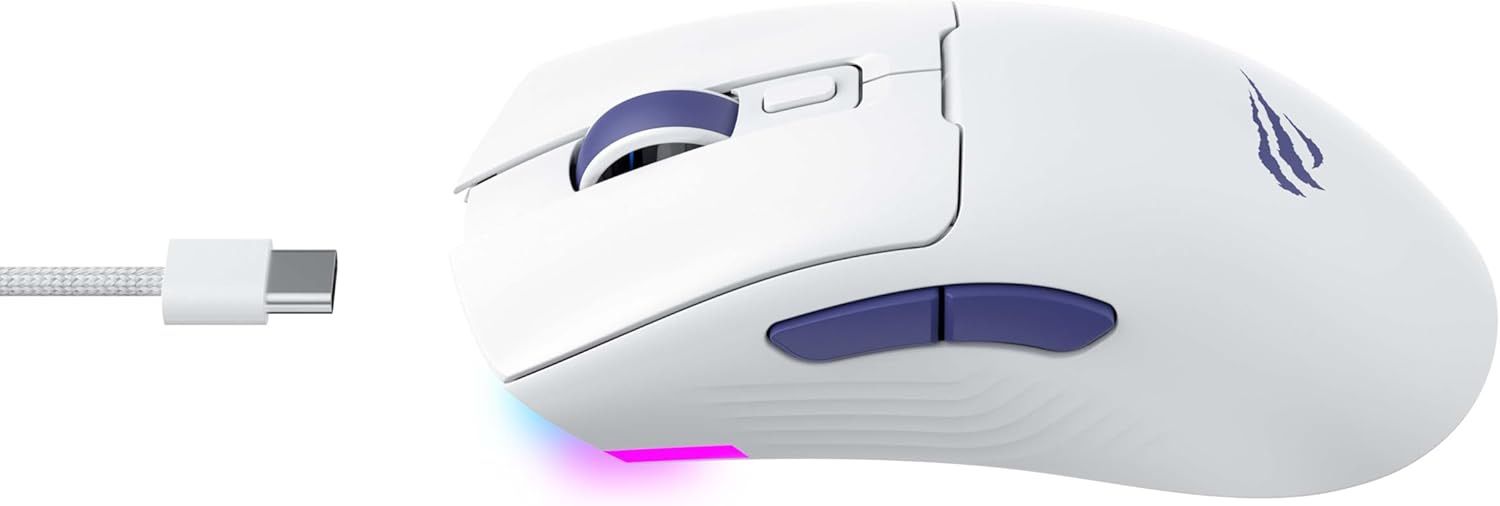
Figure 1: Havit MS966SE Gaming Mouse with USB-C cable.
2. Тохиргоо
2.1 Савлах
Carefully remove the mouse and all accessories from the packaging. Ensure all components are present:
- Havit MS966SE Тоглоомын Хулгана
- USB-C-аас USB-A кабель
- 2.4GHz USB хүлээн авагч
- Хэрэглэгчийн гарын авлага (энэ баримт бичиг)
2.2 Хулгана холбох
The MS966SE offers three connectivity options:
2.2.1 2.4GHz утасгүй горим
- Insert the 2.4GHz USB receiver into an available USB-A port on your computer.
- Locate the mode switch on the bottom of the mouse and slide it to the 2.4G байр суурь.
- Хулгана таны компьютерт автоматаар холбогдох болно.
2.2.2 Bluetooth 5.3 горим
- Locate the mode switch on the bottom of the mouse and slide it to the BT байр суурь.
- Компьютер эсвэл гар утасны төхөөрөмж дээрээ Bluetooth тохиргоог нээгээд шинэ төхөөрөмжүүдийг хайгаарай.
- Select "Havit MS966SE" from the list of available devices to pair.
2.2.3 USB-C утастай горим
- Connect one end of the provided USB-C cable to the mouse and the other end to an available USB-A port on your computer.
- Хулгана автоматаар утастай горимд шилжиж, цэнэглэж эхэлнэ.
Зураг 2: Хажуу тал view of the mouse, highlighting the USB-C port.
2.3 Хулгана цэнэглэх
To charge the mouse, connect it to your computer using the USB-C cable. The mouse can be used in wired mode while charging. An indicator light on the mouse will show the charging status (refer to the manufacturer's website or product packaging for specific light behaviors).
3. Ашиглалтын заавар
3.1 Товчлуурын функцууд
The Havit MS966SE features several programmable buttons for enhanced control:
- Зүүн товшилтын товчлуур: Стандарт үндсэн товшилтын функц.
- Баруун товчлуур дээр дарна уу: Стандарт хоёрдогч товшилтын функц.
- Гүйлгэх дугуй: Scrolls up/down, and acts as a middle click button.
- DPI мөчлөгийн товчлуур: Located behind the scroll wheel, this button cycles through preset DPI sensitivity levels.
- Хажуугийн товчлуурууд (Урагш/Хожуу): Ерөнхийдөө навигацид ашигладаг web browsers or can be programmed for in-game actions.

Figure 3: Side buttons and ergonomic design.
3.2 DPI тохируулга
The PixArt PMW3325 sensor allows for adjustable DPI settings up to 10,000. Press the DPI cycle button (located behind the scroll wheel) to switch between different sensitivity levels. Each press will cycle to the next preset DPI, allowing you to quickly adapt to various tasks or game scenarios.
3.3 Холболтын горимын шилжилт
To switch between 2.4GHz wireless, Bluetooth, and wired modes, use the physical switch located on the bottom of the mouse. Ensure the correct mode is selected based on your connection preference.
3.4 RGB гэрэлтүүлэг
The mouse features dynamic RGB lighting. Specific controls for RGB lighting effects, colors, and brightness may be available through dedicated software provided by Havit. Please visit the official Havit website for software downloads and further customization options.
4. Засвар үйлчилгээ
4.1 Цэвэрлэгээ
- Цэвэрлэхийн өмнө хулганаа компьютерээс салга.
- Хулганы гадаргууг зөөлөн, хуурай, хөвөнгүй даавуугаар арчина.
- Зөрүүд шороонд бага зэрэг dampдаавууг ус эсвэл зөөлөн цэвэрлэх уусмалаар хийнэ. Химийн хүчтэй бодисоос зайлсхий.
- Use a cotton swab or compressed air to clean around buttons and the scroll wheel.
- Хулганыг ус эсвэл бусад шингэн зүйлд дүрж болохгүй.
4.2 Хадгалалт
When not in use for extended periods, store the mouse in a cool, dry place away from direct sunlight and extreme temperatures. If storing for a long time, ensure the mouse is fully charged to maintain battery health.
5. Алдаа засах
5.1 Хулгана хариу өгөхгүй байна
- Эрчим хүчийг шалгах: Ensure the mouse is turned on and has sufficient battery charge.
- Холболтыг шалгах:
- Утастай горим: USB-C кабель нь хулгана болон компьютерт найдвартай холбогдсон эсэхийг шалгаарай. Өөр USB порт ашиглаж үзнэ үү.
- 2.4GHz утасгүй: Ensure the USB receiver is properly inserted and the mouse is set to 2.4G mode. Try a different USB port for the receiver.
- Bluetooth горим: Ensure Bluetooth is enabled on your device and the mouse is paired. Try unpairing and re-pairing the mouse.
- Дахин эхлүүлэх: Компьютер болон хулганаа дахин эхлүүлнэ үү.
5.2 DPI өөрчлөгдөхгүй байна
- Ensure you are pressing the correct DPI cycle button.
- If using custom software, check the DPI settings within the software.
5.3 Lag or Disconnections in Wireless Mode
- хөндлөнгийн оролцоо: Move the mouse closer to the receiver/device. Avoid obstacles between the mouse and receiver.
- Батерейны түвшин: Low battery can affect wireless performance. Charge the mouse.
- USB порт: Try connecting the 2.4GHz receiver to a different USB port, preferably a USB 2.0 port if available, as some USB 3.0 ports can cause interference.
6. Техникийн үзүүлэлтүүд
| Брэнд | Хавит |
| Загвар | MS966SE |
| Холболтын технологи | Tri-Mode: 2.4GHz Wireless, Bluetooth 5.3, USB-C Wired |
| Мэдрэгч технологи | Оптик (PixArt PMW3325) |
| DPI түвшин | Up to 10,000 adjustable DPI |
| Онцлог шинж чанарууд | Ergonomic Design, Dynamic RGB Lighting |
| Тохиромжтой үйлдлийн системүүд | Windows, macOS, Linux |
| Тохиромжтой төхөөрөмжүүд | Notebook, Personal Computer, Tablet, Smartphone |
| Хулганы жин | Ойролцоогоор 68 грамм |
| Зайны төрөл | Лити-ион |
7. Баталгаат хугацаа ба дэмжлэг
7.1 Баталгаат хугацааны мэдээлэл
This Havit MS966SE Gaming Mouse comes with a 1 жилийн үйлдвэрлэгчийн баталгаа. Баталгаат заргад зориулж худалдан авалтаа нотлох баримтаа үлдээнэ үү. Баталгаат хугацаа нь ердийн ашиглалтын үед хийгдсэн материал, хийцийн согогийг хамарна.
7.2 Хэрэглэгчийн дэмжлэг
For technical assistance, troubleshooting beyond this manual, or warranty inquiries, please contact Havit customer service directly. You can find the most up-to-date contact information and support resources on the official Havit webсайт (www.havit.com).


