1. Бүтээгдэхүүн дууссанview
The BN-LINK WiFi Smart Plug (Model CP-J31WT) allows you to control your home appliances remotely, set schedules, and use voice commands for a smarter, more convenient lifestyle. This compact plug is designed for ease of use and integrates seamlessly with popular smart home platforms.

Image: BN-LINK WiFi Smart Plug overview with icons for WiFi, timer, app control, voice control, remote operation, and group control.
Гол онцлогууд:
- Алсын удирдлага: Turn appliances ON/OFF from anywhere using your smartphone.
- Дуут удирдлага: Гар ашиглахгүйгээр ажиллахын тулд Alexa болон Google Home-той нийцтэй.
- Таймер функц: Schedule appliances to turn ON/OFF automatically, saving energy and preventing overcharging.
- Компакт дизайн: Small size ensures it doesn't block adjacent outlets.
- Аюулгүй байдлын онцлогууд: Equipped with high-temperature flame-retardant material, overload protection, electric shock prevention, and anti-tracking design.

Image: Diagram highlighting the smart plug's features: LED indicator, ON/OFF button, WiFi connection, timer function, remote operation, and voice control.
2. Аюулгүй байдлын мэдээлэл
Энэ бүтээгдэхүүнийг хэрэглэхээсээ өмнө аюулгүй байдлын бүх зааврыг уншиж, ойлгоорой. Эдгээр зааврыг дагаж мөрдөхгүй байх нь цахилгаан цочрол, гал түймэр эсвэл ноцтой гэмтэл учруулж болзошгүй.
- Төхөөрөмжийг задлах, өөрчлөхийг хориглоно.
- Нойтон орчинд эсвэл усны ойролцоо бүү хэрэглэ.
- Залгуурыг залгуурт бүрэн оруулсан эсэхийг шалгаарай.
- Do not exceed the maximum load rating of 15A / 1500W.
- Хүүхдийн гар хүрэхгүй газар хадгална.
- Төхөөрөмжийг цэвэрлэхийн өмнө залгуураас салга.
- Энэ бүтээгдэхүүн нь зөвхөн дотор ашиглах зориулалттай.
Суурилуулсан аюулгүй байдлын онцлогууд:
- High-Temperature Flame-Retardant Material: Reduces fire risk.
- Хэт ачааллын хамгаалалт: Хэт их гүйдлийн улмаас учирч болзошгүй гэмтлээс урьдчилан сэргийлэхийн тулд цахилгааныг автоматаар тасалдаг.
- Electric Shock Prevention Design: Enhanced safety against accidental contact.
- Anti-Tracking Design: Prevents dust accumulation and potential short circuits.
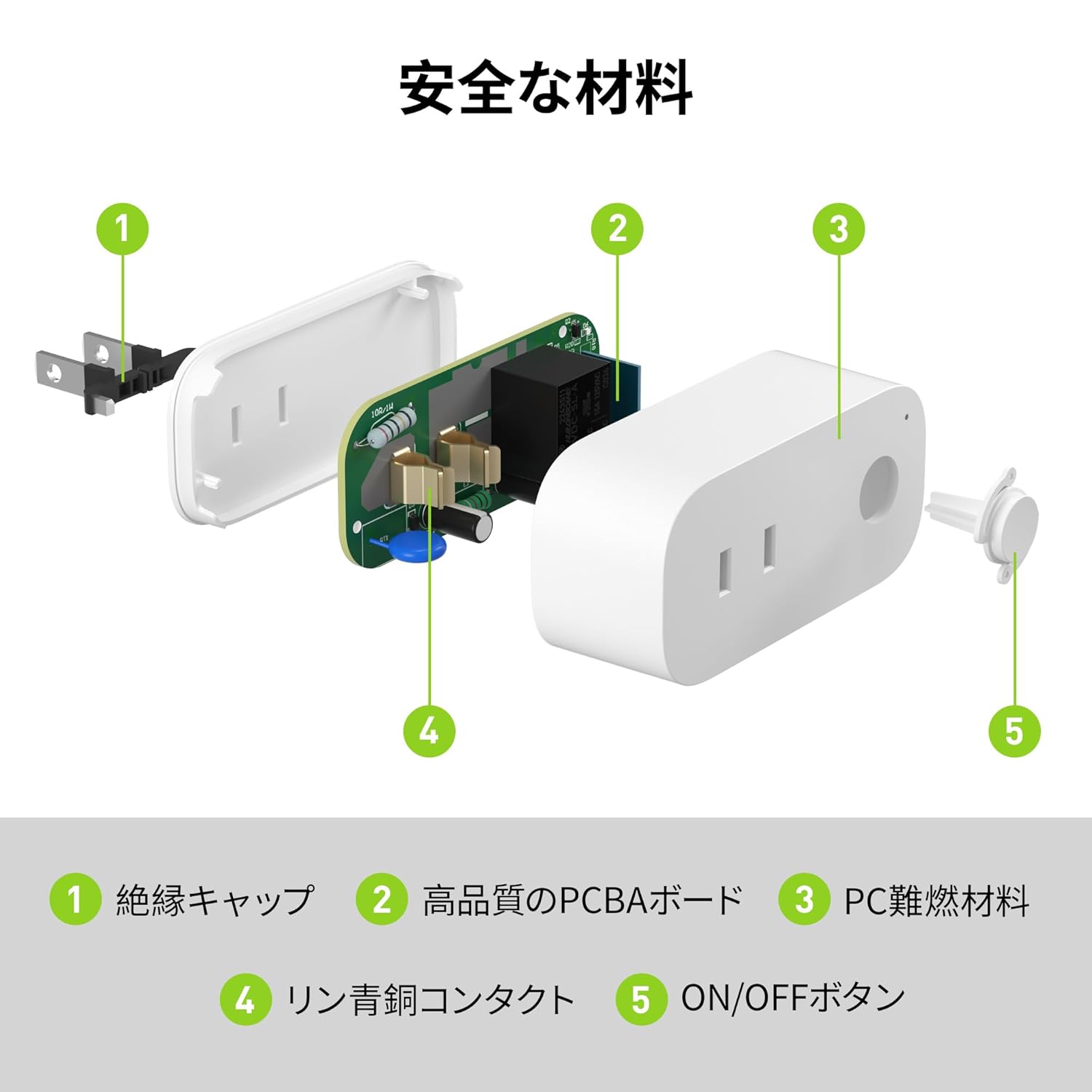
Image: Internal components of the smart plug, highlighting safety features such as the insulation cap, high-quality PCBA board, PC flame-retardant material, phosphor bronze contacts, and the ON/OFF button.
3. Тохируулах заавар
3.1. Анхны тохиргоо
- Unpack the BN-LINK Smart Plug from its packaging.
- Plug the smart plug into a standard wall outlet.
- Observe the indicator light on the plug. It should start blinking. If it does not blink, press and hold the ON/OFF button for approximately 5 seconds until it starts blinking rapidly.
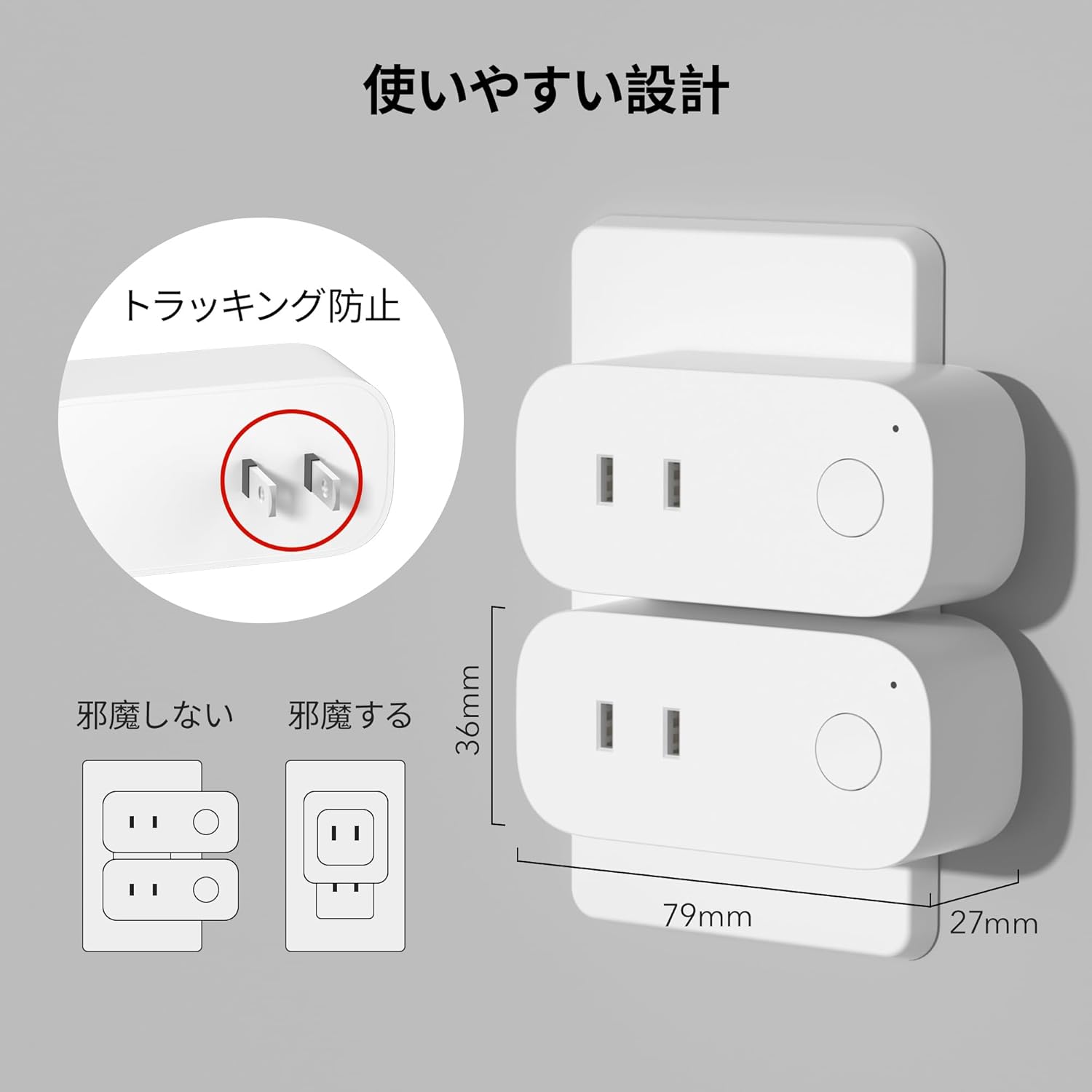
Image: The compact design of the smart plug, illustrating how it fits into an outlet without obstructing the adjacent one. Dimensions are also shown.
3.2. Апп суулгах болон Wi-Fi холболт
To utilize all smart features, you need to install the BN-LINK app and connect the plug to your 2.4GHz Wi-Fi network. This device only supports 2.4GHz Wi-Fi.
- Download the "BN-LINK" app from your smartphone's app store (Google Play Store for Android or Apple App Store for iOS).
- Аппликешныг нээгээд бүртгэл үүсгэнэ үү эсвэл танд бүртгэл байгаа бол нэвтэрнэ үү.
- Tap the "+" icon or "Add Device" to begin the pairing process.
- Төхөөрөмжийн жагсаалтаас "Ухаалаг залгуур"-ыг сонгоно уу.
- Follow the on-screen instructions to connect the smart plug to your 2.4GHz Wi-Fi network. Ensure your phone is also connected to the 2.4GHz network during setup.
- Once connected, you can rename your smart plug for easy identification (e.g., "Living Room Lamp"," "Кофе чанагч").
Video: This video demonstrates the process of connecting the smart plug to the BN-LINK app and your Wi-Fi network, including resetting the device and confirming indicator light status.
Video: This video provides a step-by-step guide on setting up the ePlugBT and connecting it to Wi-Fi, which is similar to the BN-LINK Smart Plug setup process.
4. Ашиглалтын заавар
4.1. Аппликешнээр дамжуулан алсын удирдлага
Once connected to Wi-Fi, you can control your appliances from anywhere with an internet connection.
- Open the BN-LINK app.
- Tap on the device name you wish to control.
- Use the ON/OFF toggle button within the app to switch your appliance on or off.

Image: Remote operation of the smart plug via the BN-LINK app on a smartphone. The image shows the app's ON/OFF control for a device connected to the smart plug, with a WiFi router in the background.

Image: A user controlling a smart plug remotely with their smartphone in a modern kitchen environment.
4.2. Дуут удирдлага
Integrate your smart plug with Amazon Alexa or Google Home for convenient voice commands.
- Ensure your smart plug is successfully connected to the BN-LINK app and your Wi-Fi network.
- Alexa эсвэл Google Home програмыг нээнэ үү.
- Follow the app's instructions to add a new device or skill, searching for "BN-LINK" or "Smart Plug."
- Холбогдсоны дараа та дараах дуут тушаалуудыг ашиглаж болно.
- "Alexa, [төхөөрөмжийн нэр]-г асаана уу."
- "Hey Google, [төхөөрөмжийн нэр]-г унтраа."

Image: A user in a living room controlling a lamp connected to a smart plug using voice commands with an Alexa device. The image also indicates Google Home compatibility.

Image: A smart plug connected to an outlet, being controlled by a Google Home device. A person is shown in bed, illustrating hands-free operation.
4.3. Timer Function and Scheduling
Set custom schedules to automate your appliances and manage energy consumption.
- In the BN-LINK app, select your smart plug.
- "Таймер" эсвэл "Хуваарь" хэсэгт очно уу.
- Set specific ON/OFF times for your appliances. You can create daily, weekly, or one-time schedules.
- Use the countdown timer for temporary automation, such as turning off a charger after a set period to prevent overcharging.

Image: The BN-LINK app displaying timer and scheduling features. Examples show a coffee maker turning on at 7:15 AM and a lamp turning off at 10:00 PM, demonstrating automated control.

Image: A smart plug connected to a microwave, with the app interface showing a timer set to turn the device ON at 7:00.
5. Засвар үйлчилгээ
To ensure optimal performance and longevity of your BN-LINK Smart Plug, follow these maintenance guidelines:
- Цэвэрлэгээ: Цэвэрлэхийн өмнө ухаалаг залгуурыг цахилгааны залгуураас салга. Гадаргууг хуурай, зөөлөн даавуугаар арчина. Шингэн цэвэрлэгч эсвэл шүршигч хэрэглэж болохгүй.
- Хадгалах: If not in use for an extended period, unplug the device and store it in a cool, dry place away from direct sunlight and moisture.
- Шалгалт: Periodically check the plug and outlet for any signs of damage, wear, or overheating. If any issues are found, discontinue use and contact customer support.
6. Алдаа засах
If you encounter issues with your BN-LINK Smart Plug, refer to the following common problems and solutions:
| Асуудал | Боломжит шалтгаан | Шийдэл |
|---|---|---|
| Төхөөрөмж Wi-Fi-д холбогдож чадахгүй байна. | Incorrect Wi-Fi password, 5GHz Wi-Fi network, weak signal, or device not in pairing mode. |
|
| Алсын удирдлага ажиллахгүй байна. | No internet connection on phone or smart plug, or app issue. |
|
| Дуут удирдлага хариу өгөхгүй байна. | Incorrect device name, smart assistant not linked, or internet connection issue. |
|
| Залгуур хариу өгөхгүй байна. | Хүч өгөөчtage, device malfunction, or firmware issue. |
|
7. Техникийн үзүүлэлтүүд
| Онцлог | Дэлгэрэнгүй |
|---|---|
| Брэнд | BN-LINK |
| Загварын дугаар | CP-J31WT |
| Зүйлийн жин | 70 гр |
| Багцын хэмжээ | 8.2 x 4.7 x 4.3 см |
| Хэмжээ | 1 багц |
| Шилжүүлэгчийн төрөл | 1 чиглэлтэй |
| Оруулсан бүрэлдэхүүн хэсгүүд | Smart Plug body, Instruction Manual |
| Batteries Used | Үгүй |
| Үйлдлийн горим | АСААХ, УНТРААХ |
| Одоогийн үнэлгээ | 15 Amps |
| Үйл ажиллагааны ботьtage | 100 вольт |
| Холбогч төрөл | Plug-in |
| Материал | Хуванцар |
| Хэлхээний төрөл | 1 чиглэлтэй |
8. Баталгаат хугацаа ба дэмжлэг
BN-LINK products are designed for quality and reliability. For warranty information and customer support, please refer to the contact details provided in the product packaging or visit the official BN-LINK webсайт.
For further assistance, you may also contact the seller directly through the Amazon platform.
Онлайн нөөцүүд:
- Official BN-LINK Webсайт: www.bn-link.com (Анхаарна уу: Энэ бол орлуулагч юм URL, replace with actual if available)
- Амазоны бүтээгдэхүүний хуудас: Amazon.co.jp Product Page


