1. Бүтээгдэхүүн дууссанview
The NovaStar TB20 Plus is a high-performance, cost-effective asynchronous LED controller designed for managing full-color LED displays. It offers smart features such as Wi-Fi connectivity, remote management, and mobile app control, making it suitable for various applications including storefront signs, retail displays, and promotional screens.
Гол онцлогууд нь:
- High Pixel Load Capacity: Supports up to 650,000 pixels with resolutions up to approximately 1920x1080, compatible with various LED module scan configurations.
- Dual Network Connectivity: Built-in 2.4GHz Wi-Fi and 10/100M Ethernet for remote content updates and device monitoring.
- Мобайл програмын менежмент: Free iOS and Android app for managing multiple devices, scheduling playlists, and performing OTA firmware updates.
- Rich Multimedia Support: Plays MP4, AVI, MOV (H.264), JPG, PNG, BMP formats, scrolling text, live clock, and real-time weather. Supports multi-zone layouts.
- Залгаад тоглуулах суурилуулалт: Compact design, powered by standard DC 5V/2A, with content loading via USB drive.
- Өргөтгөх боломжтой хадгалах сан: 8GB internal storage with microSD/TF card expansion capability.
- Үйл ажиллагааны өргөн хүрээ: Functions reliably in temperatures from -20°C to +60°C.
2. Юу багтсан
Бүх зүйл багцад байгаа эсэхийг шалгана уу:
- NovaStar TB20 Plus Playback Controller ×1
- DC 5V / 2A Power Adapter ×1
- Quick Start Guide ×1 (includes English instructions)

Image: The NovaStar TB20 Plus controller with its Wi-Fi antenna connected, showing the various ports and indicator lights.
3. Тохируулах гарын авлага
Follow these steps for initial setup of your NovaStar TB20 Plus controller:
- Connect to LED Display: Connect the TB20 Plus to your LED display using an Ethernet cable from the controller's Ethernet output port to the receiving card of the LED display.
- Эрчим хүчийг холбох: Plug the DC 5V / 2A power adapter into the controller's power input port and then into a power outlet. The PWR indicator light should illuminate.
- Сүлжээний холболт:
- Wi-Fi: Attach the provided Wi-Fi antenna to the designated port. You can configure Wi-Fi settings later via the mobile app or web интерфейс.
- Ethernet: For a wired connection, connect an Ethernet cable from your network router or switch to the controller's Ethernet input port.
- Initial Content Loading (Optional): To load content directly, insert a USB drive containing your media files into the USB port. The controller can automatically play content from the USB drive after setup.
- Мобайл програм суулгах: Download the official NovaStar mobile application from the iOS App Store or Google Play Store on your smartphone or tablet.
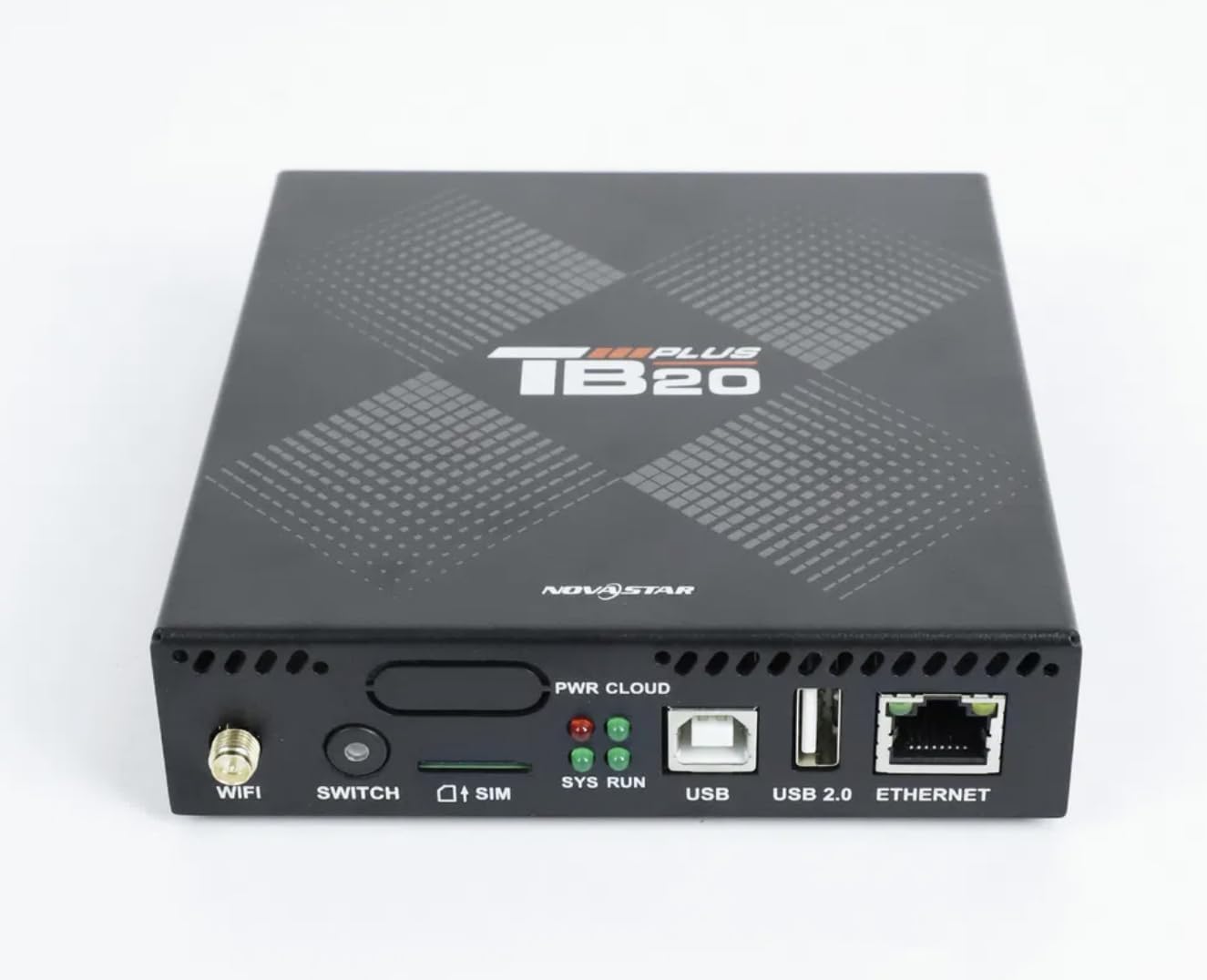
Зураг: Ойрын нүүр view of the NovaStar TB20 Plus, highlighting the Wi-Fi antenna port, SIM card slot, USB ports, and Ethernet port.
4. Ашиглалтын заавар
The NovaStar TB20 Plus offers flexible content management and control options:
4.1. Мобайл програмын хяналт
Use the dedicated mobile app for comprehensive control:
- Төхөөрөмжийг хослуулах: Open the app and follow the on-screen instructions to discover and pair with your TB20 Plus controller via Wi-Fi or Ethernet.
- Агуулга байршуулах: Медиа байршуулах files (videos, images, text) from your mobile device or cloud storage to the controller.
- Тоглуулах жагсаалтын менежмент: Create and manage playlists, schedule playback times, and set display effects.
- Алсын хяналт: Monitor the status of your LED display and controller, receive fault alerts, and adjust settings remotely.
- OTA Firmware Updates: Perform over-the-air firmware updates to ensure your device has the latest features and improvements.
4.2. USB Content Playback
For quick content updates without a network connection:
- Save your media files (MP4, JPG, etc.) to a USB drive.
- Insert the USB drive into the USB port on the TB20 Plus.
- The controller will detect the new content and can be configured to automatically play it or add it to the device's internal storage.
4.3. Мультимедиа дэмжлэг
The TB20 Plus supports a wide range of media types and display features:
- Видео форматууд: MP4, AVI, MOV (H.264).
- Зургийн формат: JPG, PNG, BMP.
- Динамик контент: Scrolling text, live clock, real-time weather.
- Байршил: Multi-zone layouts for professional visual effects, allowing different content to be displayed simultaneously in various areas of the screen.
5. Засвар үйлчилгээ
Proper maintenance ensures the longevity and optimal performance of your NovaStar TB20 Plus:
- Цэвэрлэгээ: Keep the device clean and free from dust. Use a soft, dry cloth for cleaning. Avoid liquid cleaners.
- Агааржуулалт: Ensure adequate airflow around the device to prevent overheating. Do not block ventilation holes.
- Програм хангамжийн шинэчлэлтүүд: Regularly check for and apply firmware updates via the mobile app or web interface. Updates often include performance improvements and bug fixes.
- Хадгалах: Хэрэв төхөөрөмжийг удаан хугацаагаар хадгалах бол цахилгаан тэжээлээс салгаад сэрүүн, хуурай газар хадгална уу.
6. Алдаа засах
Дараах нийтлэг асуудал, шийдлүүдийг үзнэ үү.
| Асуудал | Боломжит шалтгаан | Шийдэл |
|---|---|---|
| LED дэлгэц дээр харагдахгүй | Power issue, incorrect cable connection, display settings. | Check power adapter connection. Verify Ethernet cable connection to LED display. Ensure display is powered on and configured correctly. |
| Cannot connect via Wi-Fi/Ethernet | Incorrect network settings, weak signal, network interference. | Ensure Wi-Fi antenna is attached. Verify network cable is securely connected. Check Wi-Fi password. Restart the controller and router. |
| Content not playing | Дэмжигдээгүй file format, empty playlist, USB drive issue. | Check if media files are in supported formats (MP4, JPG, etc.). Verify playlist configuration in the app. Ensure USB drive is formatted correctly and contains valid files. |
| Төхөөрөмж хариу өгөхгүй байна | Програм хангамжийн алдаа, цахилгааны хэлбэлзэл. | Perform a power cycle: disconnect power, wait 10 seconds, then reconnect. If issue persists, contact support. |
7. Техникийн үзүүлэлтүүд
| Онцлог | Тодорхойлолт |
|---|---|
| Загварын нэр | TB20 Plus |
| Хамгийн их ачааллын багтаамж | ~650,000 pixels (up to 1920x1080 resolution) |
| Дотоод санах ой | 8GB (expandable via microSD/TF card) |
| Сүлжээний холболт | Wi-Fi 2.4GHz, 10/100M Ethernet |
| Эрчим хүчний оролт | DC 5V / 2А |
| Ашиглалтын температур | -20 хэмээс +60 хэм хүртэл |
| Тохиромжтой платформууд | iOS, Android, Windows |
| Бүтээгдэхүүний хэмжээс | 8"L x 5"W x 2"H (approximately 20.3 x 12.7 x 5.1 cm) |
| Холбогч төрөл | HDMI (output for display, not for input) |
| Шийдвэрлэх дэмжлэг | 1080p |
8. Баталгаат хугацааны мэдээлэл
Warranty details for the NovaStar TB20 Plus LED Playback Controller are typically provided at the time of purchase or can be found on the manufacturer's official webсайт. Баталгаат хугацааны нэхэмжлэл гаргахын тулд худалдан авалтын баримтаа хадгална уу. Баталгаа нь ерөнхийдөө хэвийн ашиглалтын нөхцөлд үйлдвэрлэлийн согогийг хамардаг.
9. Хэрэглэгчийн дэмжлэг
For further assistance with installation, configuration, technical guidance, or any other inquiries regarding your NovaStar TB20 Plus, please contact the professional support team of your vendor or the manufacturer. Refer to the contact information provided with your purchase or on the official NovaStar webсайт.


