1. Танилцуулга
This manual provides detailed instructions for the assembly, operation, and maintenance of your HUANUO L-Shaped Electric Standing Desk. Please read this manual thoroughly before assembly and use to ensure proper function and longevity of your product. Keep this manual for future reference.
2. Багцын агуулга
The HUANUO L-Shaped Electric Standing Desk is delivered in two separate packages to facilitate easier handling and ensure product protection during transit. Please verify all components are present before beginning assembly.
- Desk tabletop sections (L-shaped)
- Electric lifting columns (3 units)
- Control panel with memory settings
- LED strip with wired controller and wireless remote
- Integrated power strip (2 AC outlets, 1 Type-C, 1 USB-A)
- Кабелийн удирдлагын тавиур
- Monitor stand (2-tier design)
- Угсралтын техник хангамж болон багаж хэрэгсэл
- Цахилгаан адаптер ба кабель
- PTO shaft (small, approximately 7-8 inches long, crucial for motor connection - ensure it is not discarded with packaging)

Figure 2.1: Desk components may arrive in two separate packages for safer delivery and easier handling.
3. Тохиргоо ба угсралт
Assembly of the HUANUO L-Shaped Electric Standing Desk is designed to be straightforward. Follow the included step-by-step instructions. It is recommended to have a second person for certain steps, especially when handling the large tabletop sections.
3.1 Key Assembly Points:
- Хөл суурилуулах: Securely attach the three carbon steel legs to the designated points on the underside of the desk.
- Motor and PTO Shaft: The electric motor is pre-assembled within one leg. Connect the PTO shaft (Power Take-Off shaft) between the motor and the other leg mechanisms. This shaft is critical for synchronized height adjustment. Ensure it is correctly inserted and secured. (Refer to the detailed assembly guide for precise connection points.)
- Хяналтын самбар: Mount the control panel in the accessible location on the front edge of the desk.
- Кабелийн менежмент: Utilize the provided cable management tray to organize power cords and other cables, ensuring a tidy workspace.
- LED зурвас: Install the LED strip along the underside of the monitor stand. Connect its power and control unit to the integrated power strip.
Video 3.1: This video demonstrates the assembly process and key features of the electric L-shaped standing desk, including the LED strip installation and power connections.
4. Ашиглалтын заавар
4.1 Өндөр тохируулга
The desk features an electric lifting system allowing height adjustment from 27.6 inches to 46.5 inches. The control panel, located on the front edge of the desk, provides intuitive control.
- Дээш/Доош сум: Use the ▲ (Up) and ▼ (Down) arrows to manually adjust the desk height. The current height in inches will be displayed on the LED screen.
- Memory Presets (1-4): The desk has four programmable memory settings. To save a height: adjust the desk to your desired height, then press the 'M' button followed by the desired number (1, 2, 3, or 4). To recall a saved height, simply press the corresponding number button.

Figure 4.1: The control panel allows for precise height adjustments and saving up to four preferred positions.
4.2 LED Strip Control
The integrated RGB LED strip provides customizable ambient lighting. Control options include a wired controller, a wireless remote, or a dedicated mobile application.
- Утастай хянагч: Located near the power strip, this controller allows basic functions like power on/off, mode changes, and color selection.
- Утасгүй удирдлага: Provides full control over colors, effects, brightness, and speed settings.
- Гар утасны програм: For advanced customization and smart features, download the dedicated app (refer to the LED strip manual for app details and QR code).

Figure 4.2: The LED strip offers customizable lighting effects controlled by multiple methods.
4.3 Нэгдсэн цахилгаан залгуурууд
The desk includes a built-in power strip for convenient device charging and power access.
- 2 AC Ports: For standard electrical devices.
- 1 Type-C порт: For modern devices requiring USB-C charging.
- 1 USB-A порт: Стандарт USB цэнэглэлтэд зориулагдсан.

Figure 4.3: The integrated power hub provides easy access to charging and power for your devices.
5. Онцлогууд
- Эргономик дизайн: The adjustable height feature promotes a healthier work posture, allowing users to switch between sitting and standing. The included monitor stand further enhances ergonomics by raising screens to eye level.
- Robust Stability: Constructed with a high-strength carbon steel frame, the desk is designed for stability and durability, tested for over 50,000 lift cycles. It supports up to 220 lbs.
- Spacious L-Shape: The 63" x 55" L-shaped design provides ample workspace for multiple monitors, peripherals, and other office essentials. The 2-tier design with a monitor stand offers additional storage and organization.
- Кабелийн менежмент: A dedicated cable management tray helps keep your workspace organized and free from clutter.
- Monitor Stand Compatibility: Ширээ нь C-cl-тэй нийцдэгamp monitor stands, allowing for flexible monitor setups.

Figure 5.1: The desk offers smooth and quiet height adjustment for ergonomic benefits.

Figure 5.2: Ergonomic design with a monitor stand helps maintain a healthy posture.

Figure 5.3: The spacious L-shaped design provides ample room for your setup.
6. Засвар үйлчилгээ
- Цэвэрлэгээ: Ширээний гадаргууг зөөлөн арчих, damp даавуу. Хүчтэй химийн бодис, зүлгүүрийн цэвэрлэгчээс зайлсхий.
- Кабелийн менежмент: Periodically check and reorganize cables to prevent tangles and ensure smooth operation of the desk's moving parts.
- Motor and Legs: Ensure no obstructions are present around the lifting columns during operation. Keep the motor and leg mechanisms free from dust and debris.
7. Алдаа засах
Хэрэв та ширээн дээрээ ямар нэгэн асуудалтай тулгарвал дараах нийтлэг шийдлүүдийг үзнэ үү.
- Desk Not Adjusting: Check all power connections, including the main power cord and the connections to the control panel and motor. Ensure the PTO shaft is correctly installed and engaged.
- Uneven Adjustment: Verify that the desk is not overloaded beyond its 220 lbs capacity. Check for any obstructions under the desk.
- LED Strip Malfunction: Check the power connection to the LED strip and its controller. Ensure the remote control batteries are functional.
- Дахин тохируулах функц: If the desk is unresponsive, consult the full assembly manual for instructions on how to perform a factory reset of the control system.
8. Техникийн үзүүлэлтүүд
| Онцлог | Дэлгэрэнгүй |
|---|---|
| Брэнд | HUANUO |
| Загварын дугаар | HNESD226WN-160A-V-US |
| Хэлбэр | L-хэлбэр |
| Ширээний дизайн | Зогссон ширээ |
| Бүтээгдэхүүний хэмжээс | 55"D x 63"W x 27.56"H |
| Өндөр тохируулах хүрээ | 27.6"-аас 46.5" |
| Өнгө | Хушга |
| Үндсэн материал | Нүүрстөрөгчийн ган |
| Топ материалын төрөл | Мод |
| Жингийн багтаамж | 220 фунт хүртэл |
| Онцлог шинж чанарууд | L-Shaped Desk, Adjustable Height, LED Strip, Power Outlets, Cable Management |
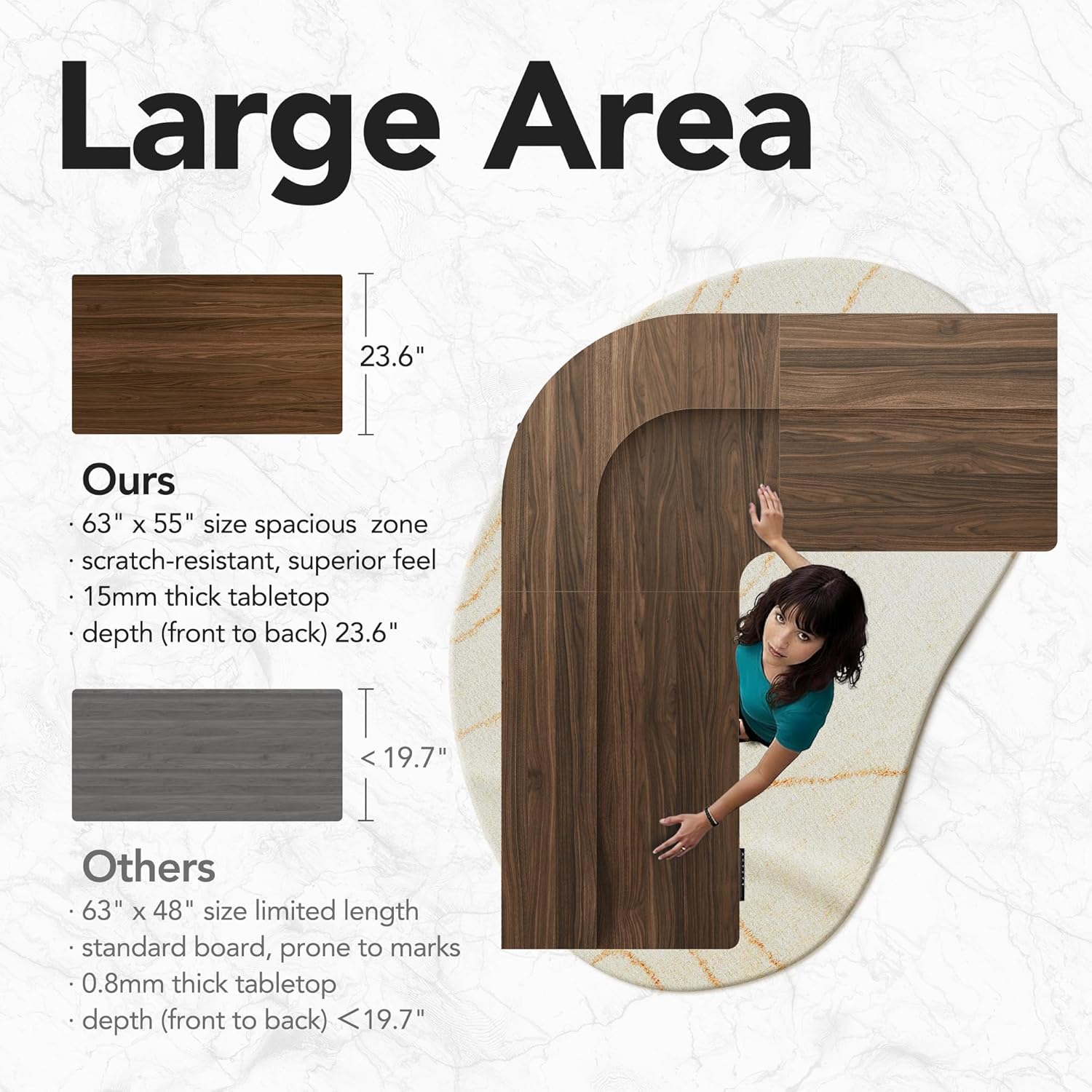
Figure 8.1: Detailed dimensions and spacious design of the desk.
9. Баталгаат хугацаа ба дэмжлэг
HUANUO products are designed for quality and durability. For any questions, concerns, or assistance with your product, please contact our dedicated U.S.-based support team. Refer to your purchase documentation for specific warranty details.
Холбоо барих мэдээлэл: Please visit the official HUANUO webдэмжлэг авахын тулд сайтад зочлох эсвэл бүтээгдэхүүний савлагаанд байгаа холбоо барих мэдээллийг лавлана уу.
Video 9.1: This video highlights the ergonomic benefits and features of the HUANUO standing desk, demonstrating its functionality in a professional setting.


