1. Танилцуулга
Худалдан авалт хийсэнд баярлалааasing the AIWA LPS-25BK Turntable. This device is designed to provide high-quality audio playback from vinyl records, as well as offering modern connectivity options such as Bluetooth, USB, and FM radio. Please read this manual carefully before using the product to ensure proper operation and to maximize its lifespan.
2. Аюулгүй ажиллагааны заавар
- Эрчим хүчний эх үүсвэр: Use only the provided AC adapter. Ensure the voltage нь адаптер дээр заасан шаардлагуудтай тохирч байна.
- Ус ба чийг: Do not expose the unit to rain, moisture, or liquids. Do not place objects filled with liquids, such as vases, on the unit.
- Дулаан: Төхөөрөмжийг радиатор, халаалтын төхөөрөмж, зуух болон бусад төхөөрөмж (үүнд орно) зэрэг дулааны эх үүсвэрийн ойролцоо бүү байрлуул. ampөргөгч) дулаан үүсгэдэг.
- Агааржуулалт: Тохиромжтой агааржуулалтыг хангах. Агааржуулалтын нүхийг хааж болохгүй.
- Цэвэрлэгээ: Цэвэрлэхийн өмнө төхөөрөмжийг цахилгааны залгуураас салга. Зөөлөн, хуурай даавуу хэрэглээрэй. Шингэн цэвэрлэгч, аэрозол цэвэрлэгч хэрэглэж болохгүй.
- Үйлчилгээ: Энэ бүтээгдэхүүнд өөрөө үйлчлэх гэж бүү оролдоорой. Бүх засвар үйлчилгээг мэргэшсэн үйлчилгээний ажилтнуудад хандаарай.
- Байршил: Place the unit on a stable, flat surface to prevent damage from falling.
3. Багцын агуулга
Бүх зүйл багцад байгаа эсэхийг шалгана уу:
- AIWA LPS-25BK Turntable Unit
- АС тэжээлийн хувиргагч
- Хэрэглэгчийн гарын авлага (энэ баримт бичиг)
- Тоос бүрхэвч
- Тавагны дэвсгэр
4. Бүтээгдэхүүн дууссанview
Familiarize yourself with the components of your AIWA LPS-25BK Turntable.
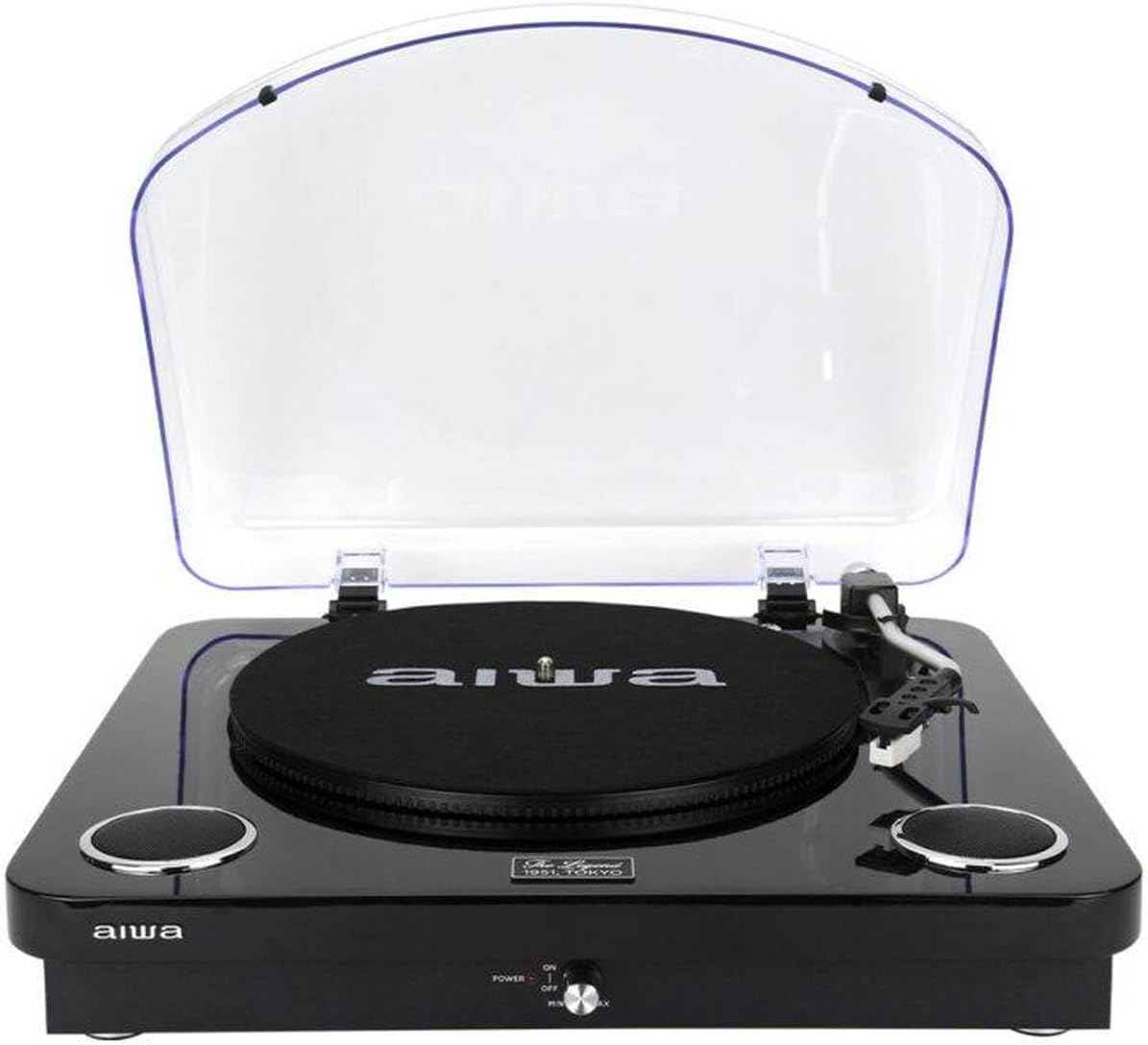
Зураг 4.1: Урд view of the AIWA LPS-25BK Turntable with the dust cover open, revealing the record platter, tonearm assembly, and integrated speakers on either side.

Зураг 4.2: Урд view of the AIWA LPS-25BK Turntable with the transparent dust cover closed, protecting the internal components.

Зураг 4.3: Хажуу тал view of the AIWA LPS-25BK Turntable, highlighting the USB port, SD card slot, and playback control buttons.
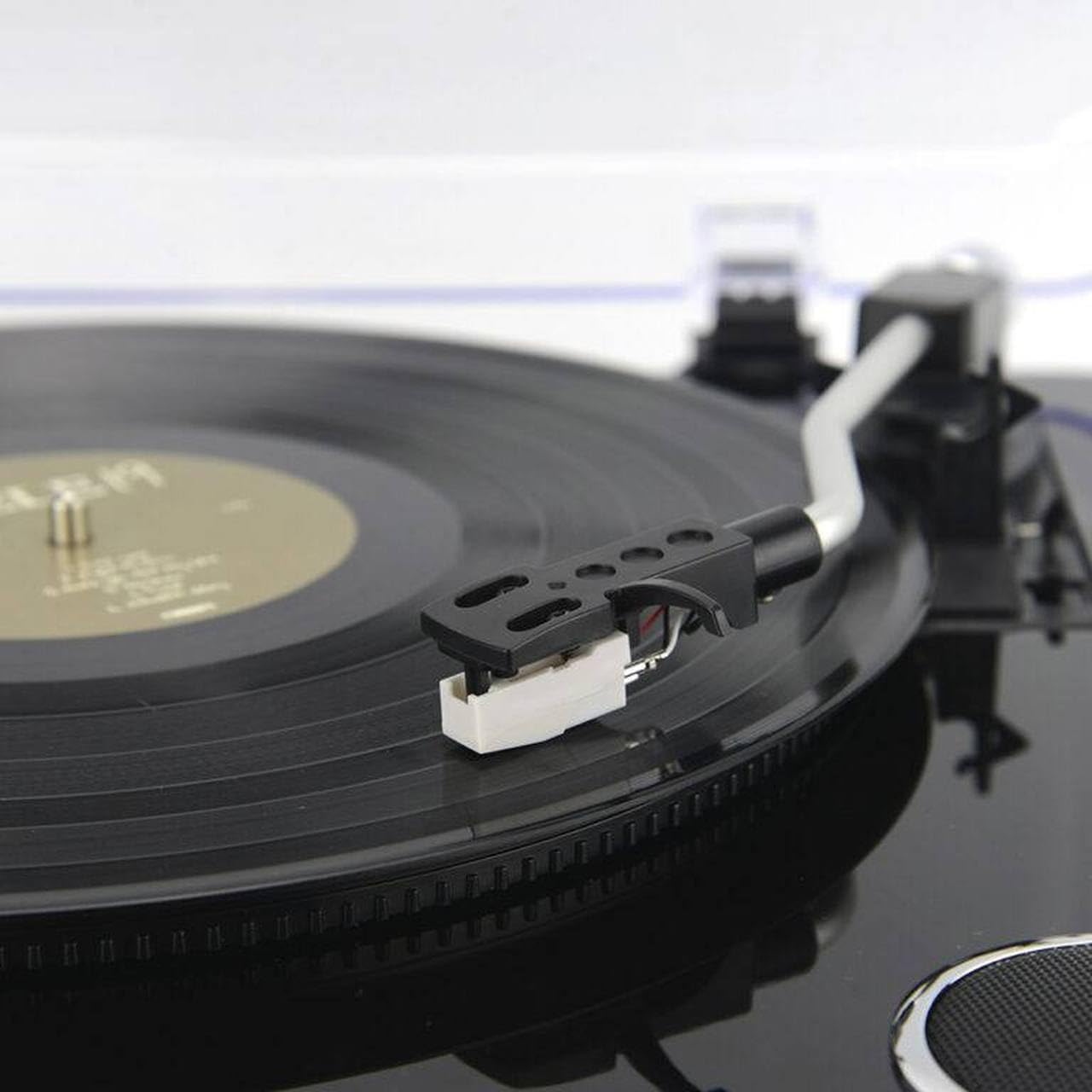
Зураг 4.4: Нарийвчилсан view of the tonearm and cartridge with the stylus, positioned over a vinyl record on the platter.
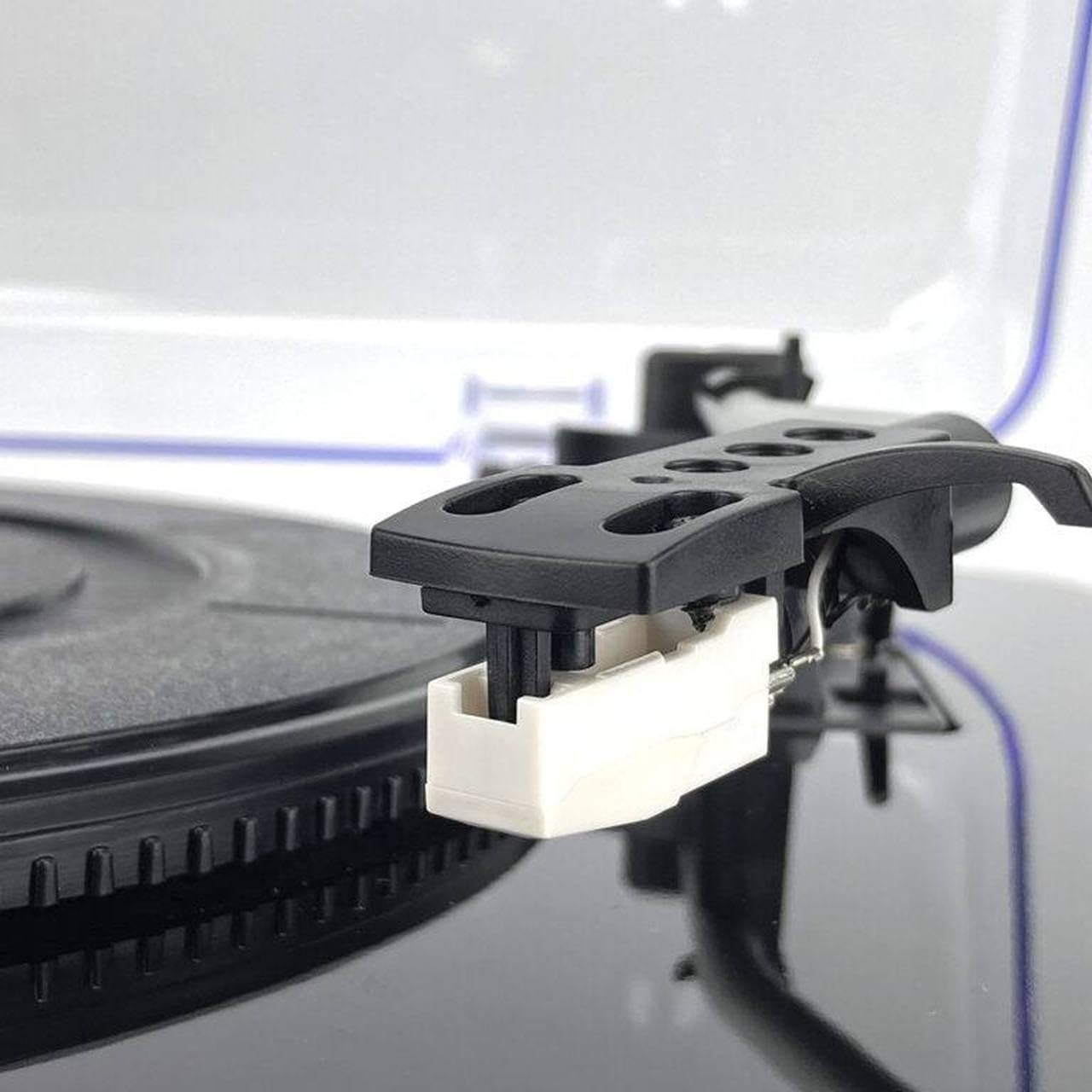
Зураг 4.5: Close-up of the white stylus (needle) attached to the cartridge, ready to play a record.

Зураг 4.6: Detail of the power switch and volume control knob, labeled 'POWER ON/OFF' and 'MIN/MAX', with a red indicator light.

Зураг 4.7: Нарийвчилсан view of the USB port, SD card slot, and control buttons including SCAN, K/DEL (Previous/Delete), M/REC (Next/Mode/Record).
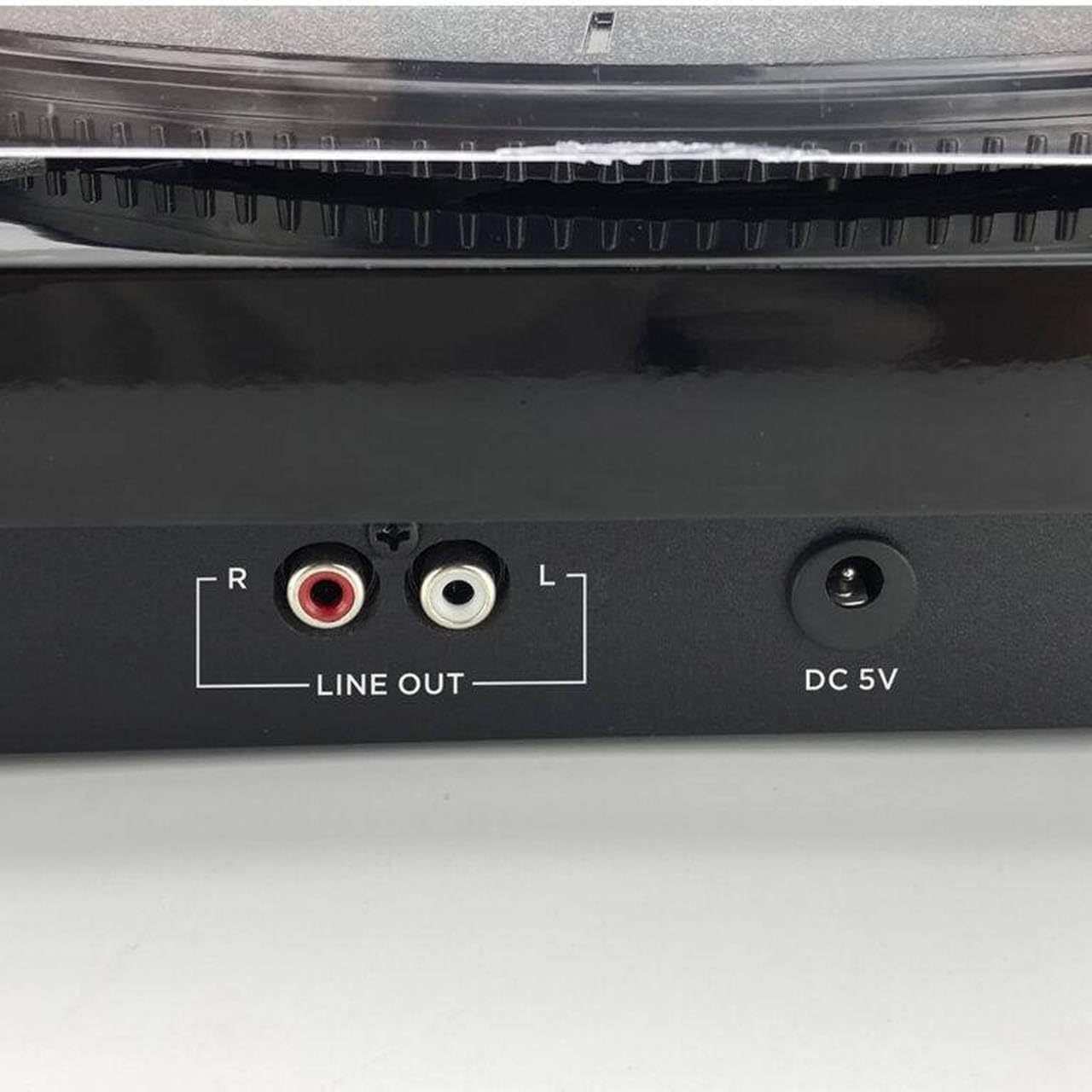
Зураг 4.8: Rear panel connections, showing the red and white RCA 'LINE OUT' ports for external audio connection and the 'DC 5V' power input jack.
5. Тохиргоо
- Нэгжийг задлах: Эргэдэг тавиурыг сав баглаа боодолоос нь болгоомжтой авч хая. Сав баглаа боодлыг ирээдүйд тээвэрлэх эсвэл хадгалахад зориулж хадгална уу.
- Тавагны дэвсгэрийг байрлуул: Эсгий тавагны дэвсгэрийг эргэдэг таваг дээр тавь.
- Тоосны бүрхүүлийг суурилуулах: Insert the hinges of the dust cover into the slots at the back of the turntable unit.
- Эрчим хүчийг холбох: Insert the DC plug of the AC adapter into the 'DC 5V' input jack on the back of the turntable. Plug the AC adapter into a wall outlet.
- Зүүний хамгаалагчийг ав: Before playing a record, carefully remove the clear plastic stylus protector from the cartridge.
6. Ашиглалтын заавар
6.1 Пянз тоглох
- Асаах: Turn the 'POWER' knob clockwise to the 'ON' position. The power indicator light will illuminate.
- Хурд сонгох: Set the speed selector switch (usually located near the tonearm base) to the appropriate speed for your record (33, 45, or 78 RPM). For 45 RPM records, you may need to use a 45 RPM adapter (not included).
- Байрны бичлэг: Таваг дээр винил бичлэгийг гол дээр нь байрлуул.
- Гараа өргөх: Хөшүүргийг ашиглан хуруугаа зөөлөн өргө.
- Гарны байрлал: Тонгарыг бичлэгийн хүссэн эхлэлийн ховилын дээгүүр хөдөлгөнө.
- Доод гар: Slowly lower the tonearm using the cueing lever. The stylus will make contact with the record, and playback will begin through the integrated speakers.
- Дууны хэмжээг тохируулах: Adjust the volume using the 'POWER/VOLUME' knob.
- Автомат буцалт: At the end of the record, the tonearm will automatically return to its rest position.
6.2 Bluetooth горим
- Асаах: Turn the 'POWER' knob clockwise to the 'ON' position.
- Сонгох горим: Press the 'MODE/REC' button repeatedly until the Bluetooth indicator light flashes, indicating pairing mode.
- Төхөөрөмжийг холбох: On your Bluetooth-enabled device (e.g., smartphone, tablet), search for available Bluetooth devices and select 'AIWA LPS-25BK'.
- Тоглуулах: Once paired, the Bluetooth indicator will stop flashing and remain solid. You can now stream audio from your device to the turntable's integrated speakers.
6.3 USB Playback and Recording
- USB диск оруулах: Insert a USB flash drive into the USB port on the side of the unit.
- Сонгох горим: Press the 'MODE/REC' button to switch to USB mode.
- Тоглуулах: Use the 'K/DEL' (Previous) and 'M/REC' (Next) buttons to navigate tracks. Press the 'K/DEL' button to play/pause.
- Recording (from Vinyl/FM): While playing a record or listening to FM radio, press and hold the 'M/REC' button to start recording to the USB drive. Press it again to stop recording. Recorded files will be saved in MP3 format.
6.4 FM радио
- Асаах: Turn the 'POWER' knob clockwise to the 'ON' position.
- Сонгох горим: Press the 'MODE/REC' button repeatedly until FM radio mode is selected.
- Сканнердах станцууд: Press the 'SCAN' button to automatically scan and save available FM radio stations.
- Тааруулах станцууд: Use the 'K/DEL' and 'M/REC' buttons to cycle through the saved stations.
6.5 RCA Аудио Гаралт
To connect the turntable to an external amplifier or powered speakers:
- Connect an RCA audio cable (not included) to the 'LINE OUT' ports (red for right, white for left) on the back of the turntable.
- Connect the other end of the RCA cable to the corresponding audio input on your ampөргөгч эсвэл цахилгаан чанга яригч.
- Ensure your external audio system is set to the correct input source.
7. Засвар үйлчилгээ
- Үзэг цэвэрлэх: Gently clean the stylus regularly using a soft brush designed for stylus cleaning, brushing from back to front. Avoid touching the stylus with your fingers.
- Нэгж цэвэрлэх: Wipe the turntable unit with a soft, dry, lint-free cloth. Do not use abrasive cleaners, waxes, or solvents.
- Тоосны бүрхэвч: Keep the dust cover closed when not in use to protect the platter and tonearm from dust. Clean the dust cover with a soft, damp даавуу.
- Бүртгэлийн тусламж үйлчилгээ: Keep your records clean and free of dust to ensure optimal sound quality and to prolong stylus life.
8. Алдаа засах
If you encounter issues with your AIWA LPS-25BK Turntable, please refer to the following common problems and solutions:
| Асуудал | Боломжит шалтгаан | Шийдэл |
|---|---|---|
| Хүч чадалгүй | Power adapter not connected; Power outlet not working; Power knob off. | Ensure AC adapter is securely connected to the unit and a working power outlet. Turn the power knob to 'ON'. |
| Чанга яригчаас дуу гарахгүй | Volume too low; Incorrect mode selected; Stylus protector still on. | Increase volume. Ensure correct mode (Phono, Bluetooth, USB, FM) is selected. Remove stylus protector. |
| Бичлэг алгасах | Record is dirty or scratched; Turntable not on a stable surface; Stylus is dirty or worn. | Clean the record. Place the turntable on a stable, level surface. Clean or replace the stylus. |
| Bluetooth холбогдоогүй байна | Turntable not in pairing mode; Device too far; Incorrect device selected. | Ensure turntable is in Bluetooth pairing mode (flashing indicator). Move device closer. Select 'AIWA LPS-25BK' from your device's Bluetooth list. |
| FM хүлээн авах чадвар муу байна | Weak signal; Unit placement. | Adjust the position of the unit to improve reception. |
9. Техникийн үзүүлэлтүүд
- Загварын нэр: LPS-25BK
- Брэнд: Айва
- Эргэлтийн хурд: 33 1/3, 45, 78 RPM
- Хамгийн их эргэлтийн хурд: 78 эргэлт
- Bluetooth хувилбар: 5.4
- Нэгдсэн чанга яригч: 2 x 5W RMS
- Холболт: Bluetooth, USB, RCA Line Out
- Нэмэлт онцлогууд: FM Radio, Automatic Tonearm Return, USB Playback/Recording
- Эрчим хүчний оролт: DC 5V (AC адаптераар дамжуулан)
- Материал: Металл (явах эд ангийн бүрэлдэхүүн хэсгүүд)
- Бүтээгдэхүүний жин: 4 кг
- Өнгө: Хар
- Тохиромжтой төхөөрөмжүүд: Amplifier, Speakers, Personal Computer, Bluetooth Speaker
10. Баталгаат хугацаа ба дэмжлэг
The AIWA LPS-25BK Turntable comes with a standard manufacturer's warranty. Please refer to the warranty card included in your package or contact your retailer for specific warranty terms and conditions. For technical support or service inquiries, please contact the AIWA customer service department or your authorized dealer.


