1. Танилцуулга
This manual provides comprehensive instructions for the setup, operation, and maintenance of your GOBOULT Mustang Racer Smart Watch. Please read this manual thoroughly before using the device to ensure proper functionality and to maximize your user experience. Keep this manual for future reference.
2. Хайрцагт юу байна
Бүх зүйл багцад байгаа эсэхийг шалгана уу:
- GOBOULT Mustang Racer Smart Watch
- Цэнэглэх кабель
- Хэрэглэгчийн гарын авлага (энэ баримт бичиг)
- Баталгаат карт
3. Бүтээгдэхүүн дууссанview
Familiarize yourself with the key components of your GOBOULT Mustang Racer Smart Watch.
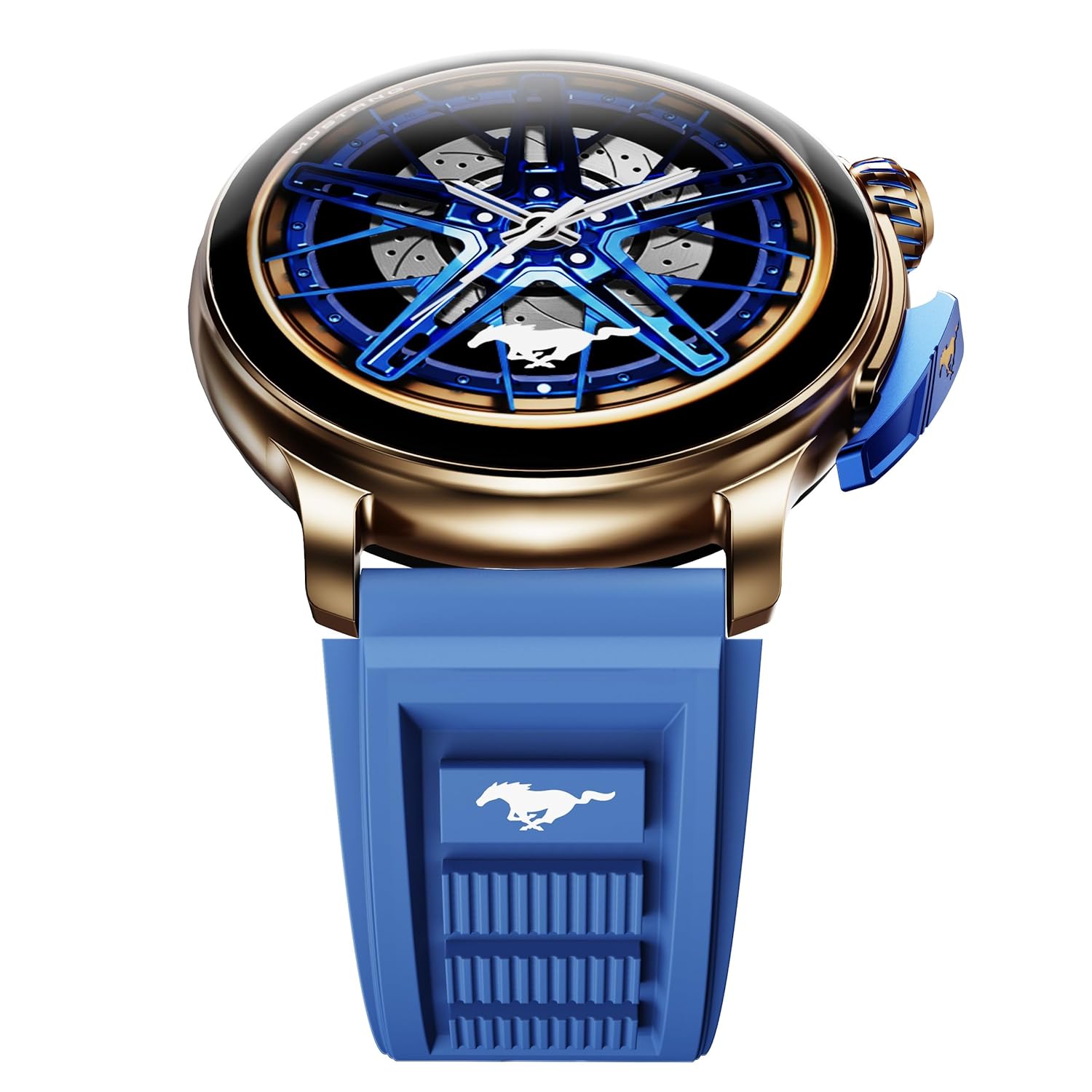
Image: The GOBOULT Mustang Racer Smart Watch, showcasing its 1.43-inch AMOLED display and overall design.
Display and Bezel
The watch features a 1.43-inch AMOLED display with 500 Nits brightness for clear visibility. The functional rotating bezel allows for intuitive navigation through menus and features.

Зураг: Нарийвчилсан view of the smartwatch's 1.43-inch AMOLED display and the rotating bezel, highlighting its design and brightness.
Buttons and Crown
The watch includes a rotating tyre-tread crown for navigation and selection, along with a functional paddle shifter button for quick access to features.

Image: The smartwatch featuring its functional paddle shifter and rotating crown, designed for enhanced control.
4. Тохиргоо
4.1. Ухаалаг цагийг цэнэглэж байна
Before initial use, fully charge your smartwatch. Connect the magnetic charging cable to the charging pins on the back of the watch and plug the USB end into a compatible power adapter (not included) or a computer's USB port. The watch will display a charging indicator. A full charge takes approximately 120 minutes.
4.2. Асаах/унтраах
- Асаах: Press and hold the main power button (crown) for a few seconds until the GOBOULT logo appears.
- Унтраах: From the watch face, swipe down to access quick settings, or navigate to the settings menu. Select "Power Off" and confirm. Alternatively, press and hold the main power button until the power-off option appears.
4.3. Ухаалаг утастайгаа хослуулах
To unlock all features, pair your GOBOULT Mustang Racer Smart Watch with the companion app on your smartphone via Bluetooth.
- Download the official GOBOULT app from your smartphone's app store (iOS App Store or Google Play Store).
- Ухаалаг утсан дээрээ Bluetooth идэвхжсэн эсэхийг шалгаарай.
- Open the GOBOULT app and follow the on-screen instructions to create an account or log in.
- In the app, select "Add Device" or similar option.
- Select "GOBOULT Mustang Racer" from the list of available devices.
- Хослуулах хүсэлтийг ухаалаг гар утас болон ухаалаг цагныхоо аль алинд нь баталгаажуулна уу.
Once paired, the watch will synchronize data with your phone, and you can customize settings through the app.

Image: The smartwatch highlighting its Bluetooth V5.3 connectivity for quick syncing and IP67 water resistance.
5. Ашиглалтын заавар
5.1. Навигаци
- Дээш/Доош/Зүүн/Баруун тийш шудрах: Navigate through menus, notifications, and quick access panels.
- Товш: Зүйлийг сонгох эсвэл үйлдлийг баталгаажуулна уу.
- Rotating Bezel/Crown: Rotate to scroll through lists or adjust settings. Press to select or return to the home screen.
- Paddle Shifter Button: Customizable shortcut for frequently used functions (e.g., sports modes).
5.2. Bluetooth дуудлага
With integrated speaker and microphone, you can make and receive calls directly from your wrist after pairing with your smartphone.
- Цагаа утастайгаа Bluetooth-ээр холбосон эсэхээ шалгаарай.
- To make a call: Access the dialer or contacts list on your watch.
- To receive a call: An incoming call notification will appear on your watch. Tap to answer or decline.
5.3. Цагны нүүр
Customize your watch's appearance with over 150 watch faces, including exclusive Mustang designs. Long-press the watch face to change it, or use the companion app for more options.

Зураг: Ухаалаг цагны шоуasing multiple watch face options, including exclusive Mustang designs.
5.4. Спортын горимууд
The watch supports over 120 sports modes to track your physical activities. Access sports modes from the main menu or via the paddle shifter shortcut (if configured).
- Select your desired sport.
- Start the activity. The watch will record metrics such as duration, calories burned, and heart rate.
- End the activity to save data. Review your performance in the app.

Image: The smartwatch displaying a sports tracking interface, indicating its capability to monitor various physical activities.
5.5. Эрүүл мэндийн хяналт
The GOBOULT Mustang Racer Smart Watch provides comprehensive health tracking features:
- 24x7 Зүрхний цохилтын хяналт: Зүрхний цохилтыг тасралтгүй хянадаг.
- SpO2 цусны хүчилтөрөгчийн ханалтын хэмжигч: Цусны хүчилтөрөгчийн түвшинг хэмждэг.
- Унтах хяналт: Analyzes sleep patterns (deep sleep, light sleep, awake time).
- Стресс хянах: Таны стрессийн түвшингийн талаархи ойлголтыг өгдөг.
- Цусны даралт: (Note: Smartwatch blood pressure measurements are for reference only and should not be used for medical diagnosis.)
Access these features from the watch's health menu or view хамтрагч програм дахь нарийвчилсан тайлан.

Зураг: Дотоод view of the smartwatch highlighting its health tracking sensors, with text indicating features like heart rate, SpO2, sleep, and stress monitoring.
5.6. AI дуут туслах
Activate the AI Voice Assistant on your watch to perform tasks, set reminders, or get information using voice commands. Ensure your watch is connected to your phone for this feature to function.
5.7. Ухаалаг мэдэгдэл
Receive notifications for calls, messages, and app alerts directly on your watch. Manage notification settings through the GOBOULT app.
5.8. Always On Display
The Always On Display feature allows the time and essential information to remain visible on the screen without needing to raise your wrist or press a button. This feature can be enabled or disabled in the watch settings to manage battery consumption.

Image: The smartwatch displaying the time and a car image, illustrating the Always On Display functionality.
6. Онцлогууд ба техникийн үзүүлэлтүүд
Гол онцлогууд:
- 1.43" AMOLED Display with 500 Nits Brightness
- Bluetooth Calling (BT V5.3)
- Rotating Bezel for intuitive control
- 150+ Watch Faces, including exclusive Mustang designs
- AI дуут туслах
- Health Monitoring: SpO2, Heart Rate, Sleep, Stress, Blood Pressure
- 120 гаруй спортын горим
- IP67 Усны хамгаалалттай
- Up to 7-day battery runtime with fast charging
Техникийн үзүүлэлтүүд:
| Брэнд | ГОБУЛТ |
| Загварын дугаар | GOBOULT Mustang Racer |
| Дэлгэцийн хэмжээ | 1.43 инч |
| Утасгүй төрөл | Bluetooth V5.3 |
| Батерейг цэнэглэх хугацаа | 120 минут |
| Зайны энергийн агуулга | 1.11 Ватт цаг |
| Усны эсэргүүцэл | IP67 |
| Зүйлийн жин | 55 гр |
| Гарал үүслийн улс | Хятад |
7. Засвар үйлчилгээ
7.1. Ухаалаг цагаа цэвэрлэж байна
Тогтмол цэвэрлэгээ нь цагны гадаад төрх байдал, үйл ажиллагааг хадгалахад тусалдаг:
- Дэлгэц болон биеийг зөөлөн, хөвөнгүй даавуугаар арчина.
- Зөрүүд толбоны хувьд бага зэрэг dampдаавуугаар усаар. Химийн хатуу бодис, зүлгүүрийн материал ашиглахаас зайлсхий.
- Clean the charging contacts periodically with a dry cloth to ensure proper charging.
7.2. Усны эсэргүүцэл (IP67)
The GOBOULT Mustang Racer Smart Watch is IP67 water resistant, meaning it can withstand immersion in up to 1 meter of fresh water for up to 30 minutes. It is suitable for daily use and light splashes. However, it is not recommended for swimming, showering with hot water, or diving. Avoid exposure to saltwater or chemicals, as this may damage the device.
7.3. Зайны арчилгаа
- Байнга зайгаа бүрэн цэнэглэхээс зайлсхий.
- Цагийг удаан хугацаагаар ашиглаагүй бол сэрүүн, хуурай газар хадгална уу.
- Зөвхөн өгсөн цэнэглэгч кабелийг ашиглана уу.
8. Алдаа засах
| Асуудал | Боломжит шийдэл |
|---|---|
| Цаг асахгүй байна. | Цаг бүрэн цэнэглэгдсэн эсэхийг шалгаарай. Үүнийг дор хаяж 30 минутын турш цэнэглэгчтэй холбоно уу. |
| Ухаалаг утастай хослуулах боломжгүй. |
|
| Эрүүл мэндийн буруу мэдээлэл. |
|
| Батерейны богино хугацаа. |
|
9. Баталгаат хугацаа ба дэмжлэг
Your GOBOULT Mustang Racer Smart Watch comes with a warranty as specified on the included Warranty Card. Please refer to the card for details regarding warranty period, coverage, and terms and conditions.
For technical support, product inquiries, or warranty claims, please contact GOBOULT customer service through the contact information provided on your Warranty Card or visit the official GOBOULT webсайт.
Оруулсан бүрэлдэхүүн хэсгүүд: Charging Cable, Mustang Racer Apex Blue Smart watch, User Manual, Warranty Card


